
You can check any page's HTTP status code for free in seconds: open the HTTP Status Checker, paste the full URL, and read the code the server returns — 200 means the page served normally, 301 means it permanently moved, 404 means it was not found, and 500 means the server itself failed. The checker also shows where a redirect leads, which is where the costly problems hide.
A status code is the server's one-line answer to every request, and search engines believe that answer. A page can look perfect in your browser while returning a code that tells Google it has moved, vanished or broken — and a site can lose traffic for weeks after a redesign or migration because a handful of codes were wrong. This guide decodes the codes that matter, explains redirect chains and soft 404s carefully, and works through a sample post-migration audit so you can run the same check on your own site.
How Do You Check a Status Code, Step by Step?
- Open the checker. Go to the HTTP Status Checker.
- Paste the exact URL. Include the full address as a visitor or a search result would use it — old address included. Testing the old URL is how you learn whether its redirect works.
- Read the final code and the path taken. A good result is either a direct 200, or one redirect landing on a 200. Note every hop in between.
- Check both versions. Test the address with and without www, and on http as well as https if your site ever used both. Each variant should end, in at most one redirect, on the same final page.
- Record it. For anything beyond a single page, keep a simple list: URL tested, code returned, final destination, action needed. That list is your audit.
Tool preview: a healthy 200, checked live
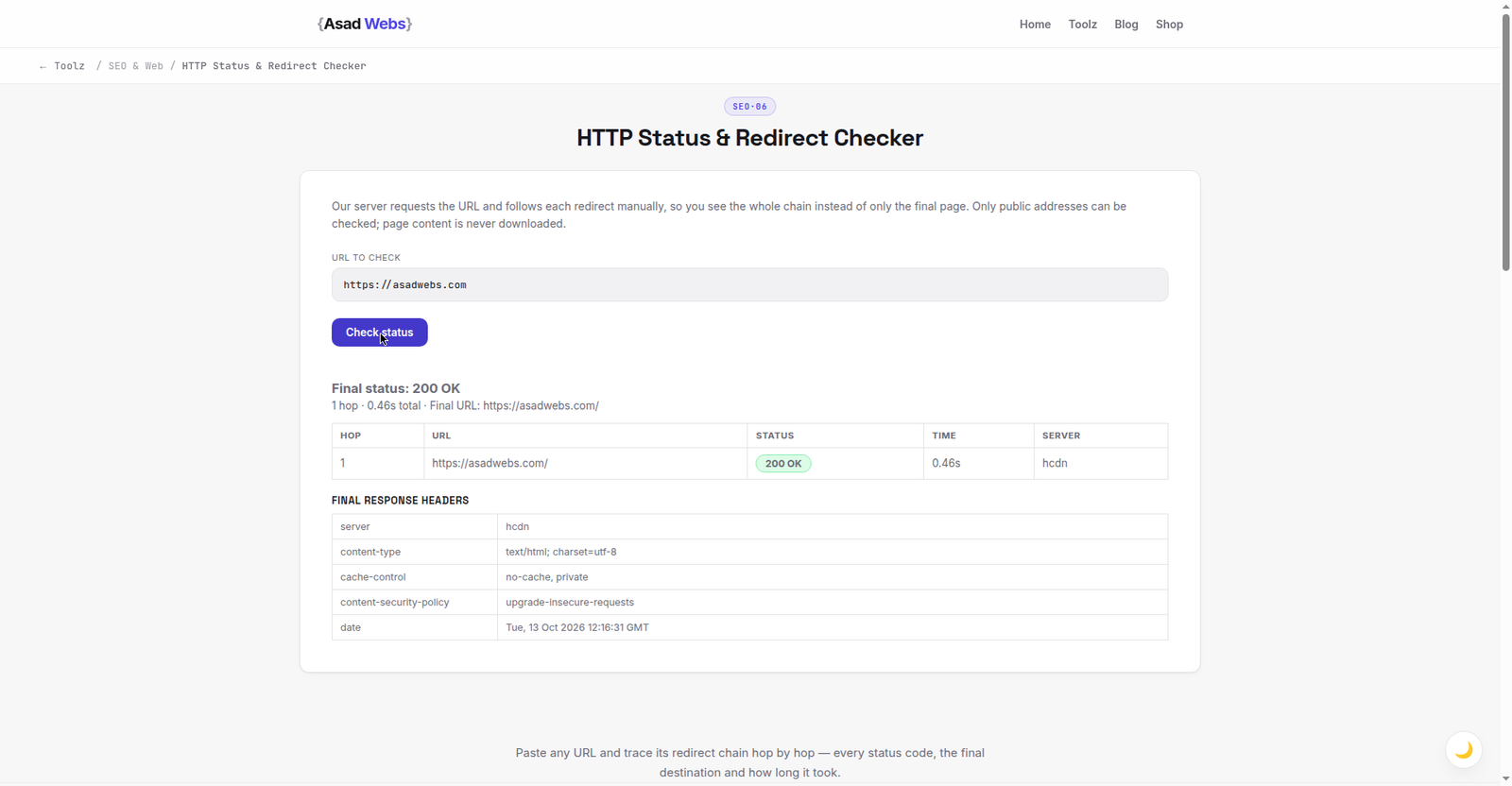
The live checker on this very website: 200 OK, one hop, no redirects, answered in under half a second. Click the preview to check any URL.
What Do the Main Status Codes Mean?
Codes group by their first digit: 2xx means success, 3xx means redirect, 4xx means the request could not be fulfilled as asked — the page is missing or access is refused — and 5xx means the server itself failed. You will meet a small set of codes constantly, and each one calls for a different response, which is why 'the site is broken' is never a precise enough diagnosis. The table is the reference to keep open while you audit.
Two distinctions in the table deserve emphasis before you start. A 301 is permanent and passes the old page's standing to the new address; a 302 or 307 is temporary and tells search engines the original may come back, so using a temporary redirect for a permanent move quietly wastes the move. And a 410 is a deliberate 'gone for good' — for a page you removed on purpose with no replacement, it is a cleaner, faster signal than leaving a 404.
| Code | Plain meaning | What to do |
|---|---|---|
| 200 | OK — the page served normally | Nothing; this is the healthy result |
| 301 | Moved permanently to a new URL | Correct for permanent moves; point it at the closest matching page |
| 302 | Found — temporarily elsewhere | Fine for short-term moves; change to 301 if the move is permanent |
| 307 | Temporary redirect, method preserved | Like a stricter 302; same rule — not for permanent moves |
| 404 | Not found at this address | Redirect if a real replacement exists; fix internal links pointing here |
| 410 | Gone — deliberately and permanently removed | Use for intentional removals with no equivalent page |
| 500 | Internal server error | Urgent: a fault in code, config or the server — investigate or escalate to hosting |
| 503 | Service unavailable, usually temporary | Expected during maintenance with a retry note; a fault if it persists |
Fix-first priority in a migration audit (illustrative score of 10) — hover or tap each bar for details.
What Is a Redirect Chain, and Why Does It Matter?
A redirect chain is what happens when URL A sends visitors to B, and B sends them on to C — sometimes further. Chains form innocently: a site moves domains, then later redesigns, and the old redirects are pointed at addresses that themselves redirect. Each hop adds a wait for the visitor, and each hop is a chance for the chain to break or for a search engine to give up following it. One redirect is normal housekeeping; three or more hops to reach a live page is a problem worth fixing by pointing A straight at the final destination.
Chains are easy to create correctly in the first place if you generate the rules carefully — our guide to creating redirects online walks through single, clean redirects. When you audit, expand every result that shows more than one hop, write down the final destination, and then rewrite the earliest rule to go there directly. Also watch for loops, where A points to B and B points back to A: the browser eventually gives up with a 'too many redirects' error, and the page might as well be down.
What Is a Soft 404? The Deceptive One
A soft 404 is a page that says 'not found' but returns a 200 code. The server claims success while the visitor reads an apology. Sites create these by designing a friendly error page and then serving it as a normal page, or by redirecting every missing address to the homepage — which produces the same confusion in a different costume, because the homepage returns 200 for a product that no longer exists.
Why it matters: search engines initially trust the code, index the empty or irrelevant page, then work out from its content that it is really an error page, and treat the whole pattern as a quality problem. Your reports also lie to you, because a checker reading codes alone sees a healthy 200. The tell is reading the destination page itself: if it says the item is gone, unavailable or not found, its code must agree — a real 404 or 410. Test your own site by typing a nonsense address after your domain; the error page you see should return 404 when you run that same address through the checker.
Worked Example: A Post-Migration Audit in Miniature
Imagine a small shop has just moved to a new website. Before launch, someone sensible lists the old site's five most important addresses — taken from the old site's own menu, its best search results and its printed materials — and checks each one. The results below are illustrative, built to show the five patterns you will meet most often, plus the fix each one needs. Notice that only one result is healthy, which is normal for a first pass after a move; the audit exists to find the other four before customers and Google do.
The order of work matters as much as the fixes. Repair the 500 first because a server error can spread or signal a deeper fault; then the missing product page, because it earns money; then the chain, because it is a five-minute rule edit; then the homepage redirect style. The old blog post with no replacement can wait a day — its correct outcome is an honest 404 while you decide whether anything replaces it.
| Old URL tested | Code found | Fix |
|---|---|---|
| /old-home (previous homepage address) | 301 → homepage, 200 | None — one clean hop to a live page |
| /best-selling-widget (key product) | 404 | Add a 301 to the new product page; update internal links |
| /summer-sale (old campaign page) | 302 → homepage | Change to 301 to the current sale page, or a 410 if the campaign is gone for good |
| /about-us | 301 → /about → 301 → /our-story, 200 | Shorten the chain: point /about-us straight at /our-story |
| /checkout-help | 500 | Escalate immediately — check server error logs and recent config changes |
Mistakes That Quietly Cost Traffic
- Redirecting every missing page to the homepage. It creates soft-404 confusion and sends visitors to a page that does not answer their intent. Redirect only where a genuine equivalent exists.
- Using 302s for a site move. Temporary codes tell search engines the old addresses may return, so a permanent migration done with 302s transfers standing slowly or not at all. Use 301.
- Forgetting the http and non-www variants. Your main address may redirect beautifully while an old printed link using another variant lands nowhere. Test all four combinations of your key pages.
- Checking only the homepage after a redesign. Homepages survive migrations; deep product and article pages are where 404s breed. Audit the pages that earned traffic, not the ones easy to remember.
- Ignoring 500s because the page 'works when I look'. Intermittent server errors often appear under load or on one variant only. A 500 in any test deserves a log check, not a shrug.
What Should You Fix First? A Simple Priority Order
Work in this order and a small audit stays manageable. First, any 5xx code on a live page, because the server is failing real visitors right now. Second, 404s on pages that earn traffic, sales or links — give them a 301 to the closest real equivalent, or restore the page. Third, chains and loops touching important pages, shortened to a single hop. Fourth, temporary redirects that should be permanent. Only then tidy the long tail of old, unlinked 404s, many of which can honestly stay 404.
Round out the audit with the page's head information, because a correct code on a page with a broken title still loses clicks: the free Meta Tag Analyzer reports those tags in the same workflow, and our guide to analysing meta tags explains what to fix there. A monthly ten-minute pass — homepage variants, top five landing pages, checkout or contact page — catches most problems while they are still cheap.
If your audit uncovered chains, server errors or a migration that never quite finished, those are structural fixes, not content tweaks. Book a free consultation with Asad Webs plus the list of URLs you tested — we will help you plan the redirect map and the repairs in the right order.
Frequently Asked Questions
How often should I check my site's status codes?
After every redesign, migration or domain change, and as a quick monthly check on your homepage variants and top landing pages. Problems appear when sites change, not while they sit still.
Is a 404 always bad?
No. A 404 is the honest, correct answer for an address that never existed or is gone with no replacement. It becomes a problem when a page people need — linked, bookmarked or ranked — returns one.
What is the difference between 301 and 302?
A 301 is permanent: it tells search engines to transfer the old page's standing to the new address. A 302 is temporary and says the original may return. Using 302 for a permanent move is a common, costly error.
Why does my missing page show as 200 in the checker?
That is a soft 404: the page displays a not-found message but the server returns success. Fix the error page or routing so a missing address returns a real 404 or 410.
How many redirects in a chain are too many?
One redirect is normal. Two is worth noting. Three or more hops to a live page should be shortened to a direct redirect, and any loop must be fixed immediately because the page never loads at all.
Can a status checker tell me why a 500 happened?
It tells you that the server failed, and when, but not the cause. For the cause, check the server error logs or ask your host — recent code, plugin or configuration changes are the usual suspects.
Should every old URL redirect somewhere?
Only URLs with a genuine modern equivalent. Forcing unrelated redirects to the homepage confuses visitors and search engines alike. An honest 404 beats a misleading 200.
Be the first to share a useful question or thought.