
You can create a redirect online for free in about a minute: open the free Redirect Generator, enter the old address and the new address, choose 301 if the move is permanent or 302 if it is temporary, and copy the rule it produces into your server file or site settings. A redirect is simply an instruction that sends visitors and search engines from one URL to another, so an old page never has to become a dead end.
Redirects matter whenever anything on a website moves: a renamed product, a redesigned service page, a domain change, or a page that has been merged into a better one. Done well, readers land exactly where they expected and search engines pass most of the old page's value to the new one. Done badly — chains, loops, or everything dumped on the homepage — redirects slow the site, confuse crawlers, and lose traffic you already earned. This guide covers the codes, the rules, and a complete worked migration.
How Do You Create a Redirect in 4 Steps?
- Open the generator. Go to the Redirect Generator in your browser — there is nothing to install and no account to create.
- Enter the old and new URLs. Paste the exact old path, for example
/services/web-design.html, and the full new destination, for example/services/web-design. Check spelling carefully: a redirect faithfully sends people to a typo, too. - Choose the status code. Pick 301 for a permanent move, 302 for a temporary one, and 307 or 308 only in the specific cases explained below. When in doubt about a page move, 301 is usually the honest answer.
- Copy the rule and test it. Add the generated line to your .htaccess file, server configuration, or CMS redirect manager, then visit the old URL in a private browser window and confirm you land on the correct new page in one hop.
Tool preview: a 301 rule, generated
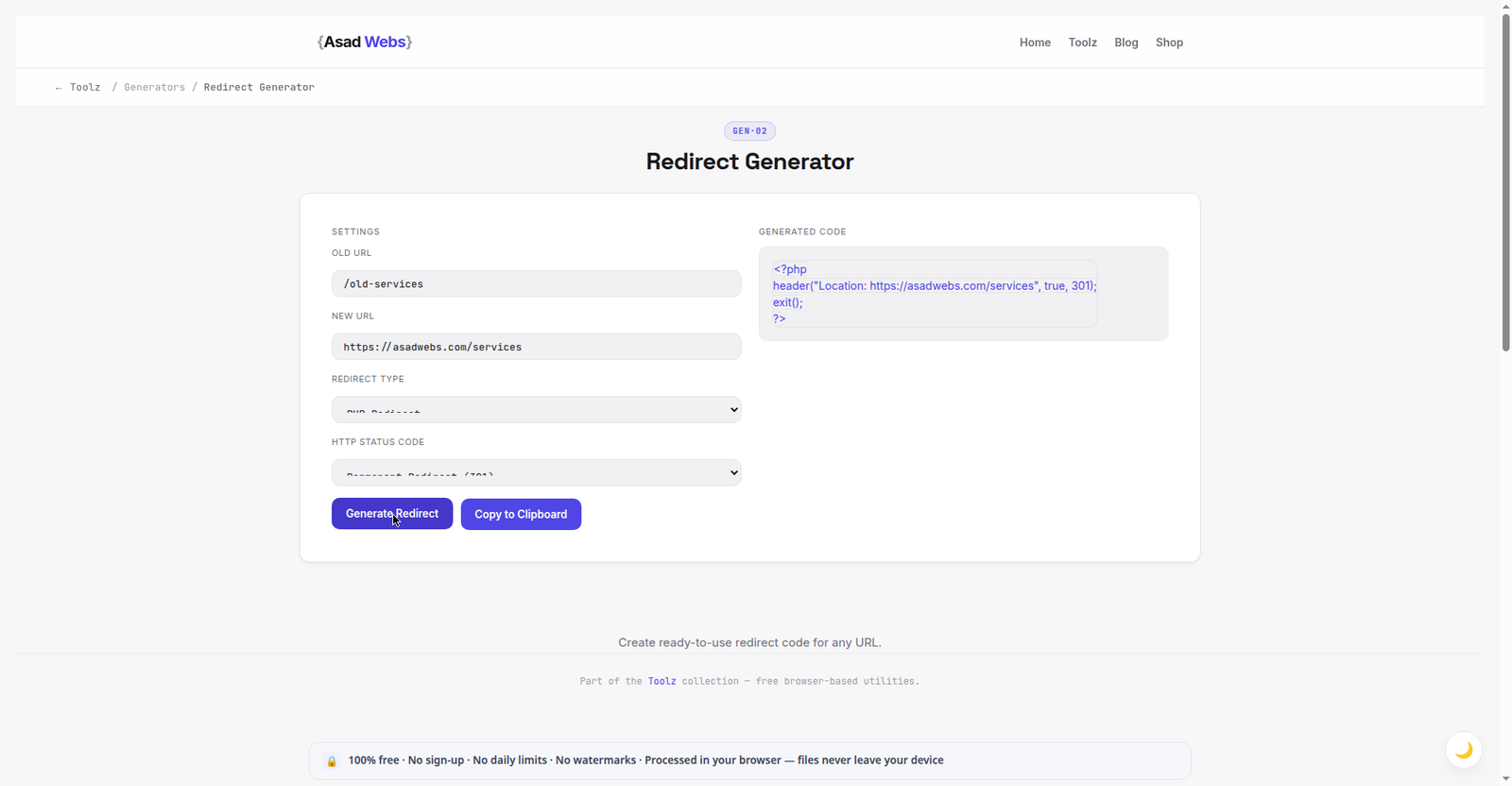
The live generator with a real rule built: /old-services points at the new services page, written out as a one-line PHP 301. Click the preview to build your own rule.
301 vs 302 vs 307 and 308: Which Redirect Should You Use?
The status code tells browsers and search engines how long the move will last and how to treat the old address. A 301 says 'this page has moved permanently — update your records and credit the new URL'. A 302 says 'this page is away temporarily — keep the old URL in the index and expect it back'. Choosing between them is a statement of intent, not a technical preference, so choose the code that tells the truth about your plans.
307 and 308 are stricter cousins. They behave like 302 and 301 respectively, but they also guarantee that the request method stays unchanged — a form submitted with POST stays a POST. That guarantee matters for checkout, login, and API-style flows, and rarely matters for ordinary page moves, which is why most site owners only ever need 301 and 302. The table below summarises the four codes in plain language.
| Code | Meaning | Typical use | Search engines |
|---|---|---|---|
| 301 | Moved permanently | Renamed pages, migrations, merged content | Credit the new URL and drop the old one over time |
| 302 | Found — temporary move | Short campaigns, A/B tests, maintenance holding pages | Keep the old URL indexed and expect it back |
| 307 | Temporary, method preserved | Temporary rerouting of form or checkout requests | Keep the old URL; do not change POST to GET |
| 308 | Permanent, method preserved | Permanent rerouting where the request method must not change | Credit the new URL; method stays exactly as sent |
A simple test before you choose: if you would be happy for the old URL to disappear from Google forever, use 301 or 308. If you would be annoyed, use 302 or 307.
Redirect codes most small sites actually need (illustrative mix) — hover or tap each bar for details.
What Do Redirect Rules Look Like in .htaccess?
On Apache servers, most redirects live in a plain-text file called .htaccess in the site root. A single permanent page move looks like this: Redirect 301 /old-page.html https://example.com/new-page. The word Redirect sets the action, 301 sets the code, the first path is where visitors arrive, and the full address at the end is where they are sent. One rule per line, oldest business first is not required — order matters only when patterns overlap.
Pattern rules handle whole groups. RewriteRule ^blog-old/(.*)$ /blog/$1 [R=301,L] moves everything under an old folder into a new folder while keeping the rest of each address. That kind of rule is powerful and easy to get subtly wrong, which is exactly why generating the line instead of typing it from memory is the safer habit. Before editing .htaccess, download a backup copy. A single misplaced character can take a site offline, and restoring the backup is a thirty-second fix when you have one. If your site runs on a CMS, prefer its redirect manager or a reputable plugin for single pages, and reserve manual .htaccess edits for folder-wide rules.
If addresses themselves need tidying before you map them, the free URL Encoder and Decoder helps you read percent-encoded paths correctly, and our guide to encoding and decoding URLs explains why a spaced or encoded path may not match the rule you wrote.
Worked Example: A Small Service-Page Migration
Imagine a web design business tidying its services section. The main page moves from /services/web-design.html to the cleaner /services/web-design, and three older sub-pages move with it. Each move is permanent, so each gets a 301. Each old page points directly at its closest new equivalent — not at the homepage, and not at a generic services overview — because a reader who bookmarked the pricing page expects pricing, not a welcome message.
The four rules are planned in a simple table first, then generated one by one, then tested after they are live. Planning on paper first is the step most people skip, and it is the step that prevents the chains described in the next section: if one new address is itself scheduled to move next month, you find out now, while the plan is still a table. Keep this mapping document after launch; when a client asks why an old link still works six months later, the table is the answer.
| Old URL | New URL | Code | Why |
|---|---|---|---|
| /services/web-design.html | /services/web-design | 301 | Same page, cleaner address without .html |
| /services/web-design-prices.html | /services/web-design#pricing | 301 | Pricing became a section of the main page |
| /services/cheap-web-design.html | /services/web-design | 301 | Thin duplicate merged into the main service page |
| /services/web-design-portfolio.html | /work | 301 | Portfolio moved to the site-wide work section |
What Are Redirect Chains and Loops, and Why Do They Hurt?
A chain happens when URL A redirects to B, and B redirects onward to C. Each hop adds a delay for the visitor and another chance for something to fail, and search engines will only follow a limited number of hops before giving up. Chains usually grow accidentally during migrations: last year's redirect is never updated when this year's redesign moves the destination again. The fix is unglamorous and effective — when you add a new redirect, check whether its destination is itself redirected, and point every older rule straight at the final address.
A loop is worse: A sends visitors to B, and B sends them back to A, so the browser spins until it gives up with a 'too many redirects' error and the page never loads at all. Loops typically come from conflicting rules — one forcing the www version of a domain and another forcing the non-www version, or a CMS plugin and a server rule fighting over the same page. Test every new rule in a private window straight after adding it, and test the homepage as well as the moved page, because global rules about www, trailing slashes, and HTTPS affect everything at once. While you are checking page health, running the moved page through the checks in our meta tag analysis guide confirms its title, canonical, and robots tags agree with the redirect instead of contradicting it.
Common Redirect Mistakes to Avoid
The most damaging mistake is redirecting every deleted page to the homepage. It feels tidy, but to a search engine a homepage redirect for an unrelated product page looks like a soft error page, and to a visitor it is simply confusing — they asked for one thing and arrived somewhere else. If no genuine equivalent exists, an honest 404 page with helpful links is better than a misleading redirect. The second common mistake is using 302 for permanent moves because it was the tool's default; over months, the old URLs stay in the index competing with the new ones, splitting clicks and links between two addresses for the same content.
- Redirecting everything to the homepage instead of the closest matching page.
- Leaving chains to grow across redesigns instead of pointing old rules at the final URL.
- Mixing codes carelessly — 302 for permanent moves, or 301 for a two-week campaign.
- Redirecting a page that still gets linked internally — update your own menus and article links to the new address instead of relying on the redirect.
- Deleting the mapping plan after launch, leaving nobody able to explain or audit the rules later.
Troubleshooting: When a Redirect Does Not Work
Work through failures in order. First, clear or bypass the cache: browsers remember 301s aggressively, so test in a private window or a different browser before concluding the rule is broken — many 'failed' redirects are a cached success being replayed. Second, check for conflicts: a CMS plugin, a CDN rule, and a server rule can all claim the same URL, and the one that runs first wins. Third, check the destination itself returns a normal 200 response; a redirect that lands on a 404 or on another redirect is a chain or an error wearing a redirect's clothes. Fourth, re-read the rule character by character — a missing trailing slash or an encoded character in the old path is enough for a rule never to match.
Decide the boundary of the DIY job honestly. Single page moves, renames, and merged pages are safe generator work for any site owner. Domain migrations, forced HTTPS and www rules, and folder-wide pattern rules touch every page at once; those deserve a careful staging test or a developer's hour, because a global mistake takes the whole site down rather than one page.
Planning a redesign or a domain move where every redirect has to be right the first time? Asad Webs plans migrations with a full URL mapping table before anything goes live. Book a free consultation and bring your list of old pages — we will map each one to its proper new home.
Frequently Asked Questions
Is the redirect generator really free?
Yes. The Redirect Generator is free, needs no account, and produces a rule you can copy straight into .htaccess or your redirect manager.
Should I use 301 or 302 for a redesigned page?
Use 301 if the new page is the permanent replacement, which covers almost all redesigns. Use 302 only when the old page is genuinely coming back, such as during a short campaign or test.
How long should I keep a 301 redirect in place?
Keep it for at least a year, and ideally indefinitely. Old links, bookmarks, and citations can surface years later, and the rule costs nothing to leave in place.
What is the difference between 301 and 308?
Both are permanent. A 308 additionally guarantees the request method is unchanged, which matters for forms and automated requests. For normal page moves, 301 is the familiar, widely supported choice.
Why does my browser say 'too many redirects'?
That error means a loop: two or more rules are sending the browser back and forth between addresses. Check for conflicting www, HTTPS, or trailing-slash rules at server, CDN, and CMS level.
Do redirects hurt SEO?
A single, well-chosen 301 from an old page to its genuine replacement preserves most of that page's value. Long chains, loops, and mass redirects to the homepage are what cause losses.
Can I redirect a page on a site I do not control?
No. Redirects are set by the owner of the site the old URL lives on. If the page is not yours, you can only link to the new address yourself or ask the owner to add the rule.
Be the first to share a useful question or thought.