
You can analyze any page's meta tags for free in under a minute: open the Meta Tag Analyzer, paste the page URL, and read the title tag, meta description, robots directives, canonical and Open Graph tags it reports. Those few lines of head code decide how your page looks in Google results and social shares — and small mistakes in them quietly cost clicks every day.
Meta tags do not rank a page by themselves, but they control the advert Google shows for it: the clickable title, the description snippet, and the image and headline when the link is shared. This guide walks through each tag the analyzer shows, what 'good' looks like, and the fixes that matter most — whether the page is yours or a competitor's you are learning from.
How to Analyze a Page's Meta Tags in 3 Steps
- Open the analyzer. Go to the Meta Tag Analyzer in your browser.
- Paste the URL. Use the full address of the exact page — homepage tags and article tags are different, and the homepage is the one everyone checks while the article is the one that ranks.
- Work down the results in priority order. Title first, then description, then robots/canonical (the ones that can hide a page entirely), then social tags. The sections below explain each.
Tool preview: a real site's tags, extracted
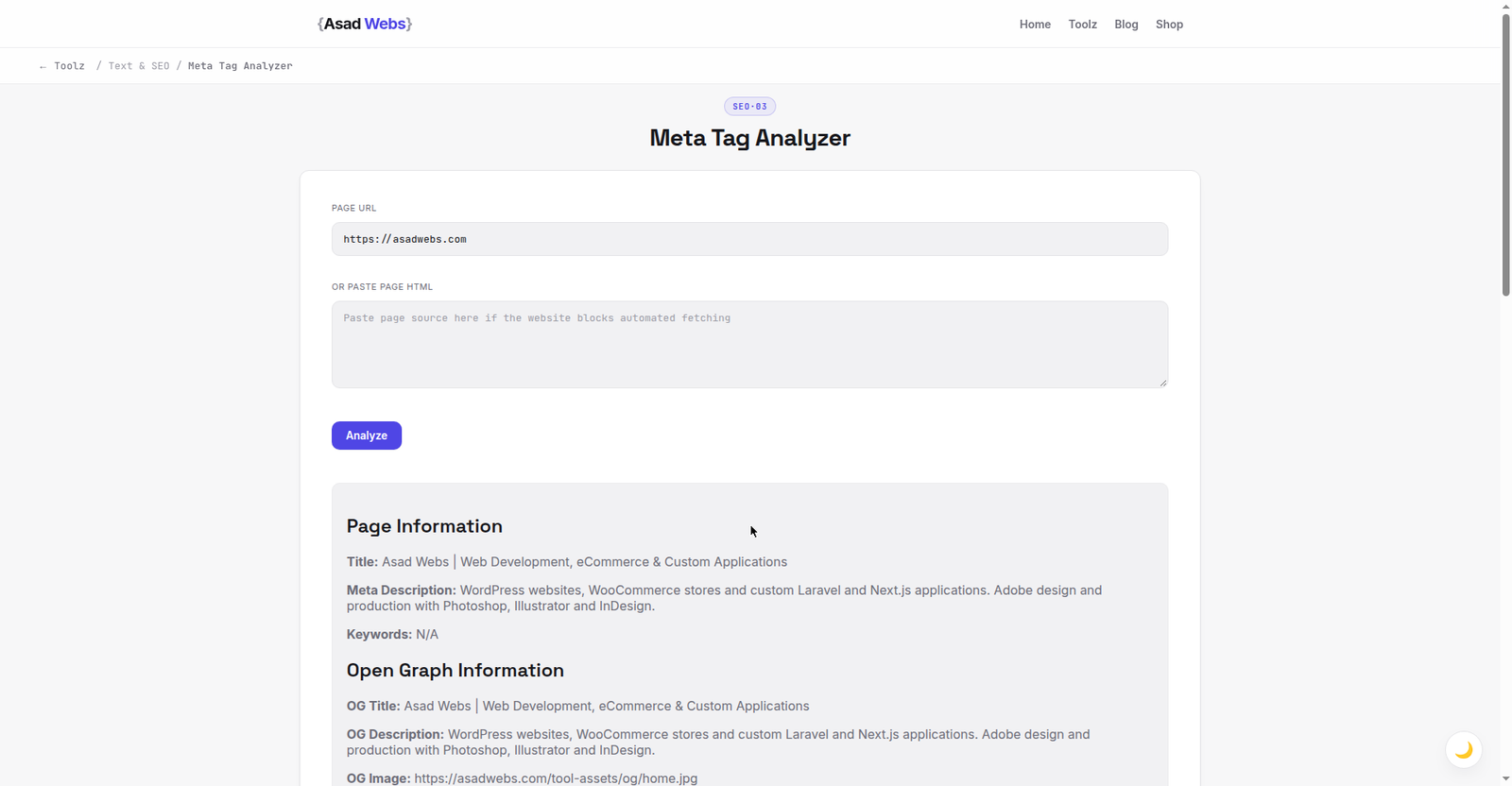
The live analyzer turned on this site itself: title, description, Open Graph and Twitter card values read straight from the live homepage. Click the preview to analyze any URL.
The Title Tag: Your Search-Result Headline
The title tag is the single most influential piece of text for both ranking relevance and click-through. Check three things. First, it exists and is unique — the same title on many pages is one of the commonest findings in an audit. Second, length: roughly 50–60 characters usually displays in full; much longer and Google truncates or rewrites it. Third, it leads with what the page is actually about, in the words a searcher would use, with the brand at the end if at all.
Compare the title against the page itself. A title promising 'complete guide' above a 300-word page is a mismatch Google may correct by rewriting your snippet — and rewritten snippets are rarely as persuasive as one you wrote deliberately.
How often common meta problems appear in small-site audits (illustrative share of pages) — hover or tap each bar for details.
Meta Description, Robots and Canonical: The Quiet Three
The meta description does not affect rankings directly, but it is your snippet's sales copy when Google uses it — roughly 150–160 characters that answer 'why click this result?' with a specific benefit or number. Missing descriptions are an opportunity lost, and duplicated ones across a site are a sign pages were templated without care.
Robots and canonical tags are where real damage hides. A stray noindex in the robots tag removes the page from Google entirely — check for it on any page that mysteriously gets no traffic. The canonical tag should point at the page's own URL (or the deliberate master version); a wrong canonical can make Google index a different page instead. The table summarises what to look for in each tag the analyzer reports.
| Tag | What good looks like | Red flag |
|---|---|---|
| Title | Unique, ~50–60 characters, describes the page | Duplicated across pages, or missing |
| Meta description | Unique, ~150–160 characters, a reason to click | Missing, duplicated, or a keyword list |
| Meta robots | Absent (default = index) or explicit index,follow | noindex on a page you want found |
| Canonical | Points to this page's own clean URL | Points to another page or the homepage |
| Open Graph | og:title, og:description and og:image all set | Missing og:image — shares show no picture |
| Viewport | Present, width=device-width | Missing — mobile rendering problems |
Worked Example: Diagnosing One Page in Two Minutes
A Leeds plumbing company wonders why its emergency repairs page gets impressions but almost no clicks. The analyzer's report on the page tells the story in four lines: the title is 92 characters and identical in pattern to five other service pages ("Welcome to Brighter Plumbing — Plumbers, Heating, Drains, Bathrooms and More Services in Leeds…"), the meta description is missing entirely, og:image is absent, and the canonical is correct. Google has been truncating the title mid-sentence and inventing a description from the page's first paragraph — an advert nobody wrote.
The fixes take minutes. The new title — "Plumber in Leeds: Same-Day Repairs | Brighter Plumbing" (54 characters) — leads with the service and city, states the differentiator, and carries the brand once, at the end. A description is written deliberately (164 characters): "Blocked drain or burst pipe in Leeds? Same-day emergency repairs, upfront prices and a 12-month guarantee from Brighter Plumbing. Call before 4pm for today's slots." Canonical and robots need no change; an og:image at 1200×630 is added so WhatsApp shares show the branded card instead of bare text. Same page, same content — but now the advert Google shows for it was written on purpose.
Open Graph Tags: How Your Link Looks When Shared
When a page is shared on WhatsApp, Facebook, LinkedIn or X, those platforms build the preview card from Open Graph tags: og:title, og:description and og:image. The analyzer shows whether they exist. The commonest gap is og:image — without it, shares appear as bare text and get a fraction of the clicks an image card earns. Use an image around 1200×630 pixels, the same size as a blog cover, so it displays cleanly everywhere.
Check that og:title is written for people sharing, not copied blindly from an over-long SEO title. Then actually test it: paste your URL into a chat with yourself and look at the card a reader would see.
Auditing a Whole Site: The Spreadsheet Pass
One page at a time is right for diagnosis; a whole site needs a system. Open a spreadsheet with one row per important page — homepage, main services, top articles first — and columns for the title and its length, the description and its length, robots, canonical, and og:image present or not. Run each URL through the analyzer and fill the row. Ten pages an hour is a realistic pace, and a small business site's money pages are usually covered in an afternoon.
The spreadsheet's real value is pattern-spotting. Meta problems on templated sites are rarely individual: one wrong setting in a theme or SEO plugin reproduces across every page of a type. When a column shows the same red flag down twenty rows, fix the template or setting once instead of editing twenty pages — then spot-check three of them live. Reserve page-by-page edits for genuinely unique pages: the homepage, the top services, the articles that earn the traffic.
Fix in This Order, Then Re-Check
Fix anything that hides the page first (noindex, wrong canonical), then the title, then the description, then social tags. After editing, run the URL through the analyzer again to confirm the live page — not just your draft — carries the new tags; caching plugins and CDNs regularly serve the old head for hours, which is why our website launch checklist includes a post-publish meta check. While you are auditing, the companion guide on checking keyword density helps you confirm the page body matches the promise its tags make, and the full toolkit is on the free tools page.
Five Meta Tag Mistakes That Cost Clicks
- The keyword-list title. "Plumber, Plumbers, Plumbing Services, Best Plumber Leeds" reads as spam to humans and engines alike. One clear phrase in the words a searcher uses beats a stuffed list.
- One description pasted across the whole site. A generic company blurb on every page wastes every snippet. Each page's description should sell that page's specific promise.
- The staging noindex that survived launch. Sites are built with noindex on, and sometimes it ships. Any page with unexplained zero traffic gets its robots tag checked first — it is the cheapest diagnosis in SEO.
- A canonical pointing home after a migration. Copied templates and bulk settings can canon every page to the homepage, quietly telling Google the other pages are copies. Spot-check canonicals after any move or redesign.
- No og:image, or one the wrong size. Shares without an image card earn a fraction of the clicks. Set a 1200×630 og:image on every page that might ever be shared — which is every page.
Auditing a whole site rather than one page? Our small business SEO checklist puts meta tags in context with the other 19 checks that move rankings — start with the analyzer above on your five most-visited pages.
Found meta tag problems on your own site? Fixing them across every page is real SEO work. Book a free consultation — technical SEO, titles and descriptions are built into every website and SEO package we deliver.
Frequently Asked Questions
Do meta tags affect Google rankings?
The title tag strongly influences relevance and clicks. The description does not rank the page directly, but a better snippet earns more clicks. Robots and canonical tags can decide whether a page is indexed at all.
How long should a title tag be?
Aim for roughly 50–60 characters so it displays in full. What matters more is that it is unique, accurate and leads with the page's real topic.
What does noindex mean in the analyzer results?
It is an instruction in the meta robots tag telling search engines not to include the page in results. On a page you want found, it is an emergency fix, not a detail.
Can I analyze a competitor's meta tags?
Yes — meta tags are public in every page's source, and the Meta Tag Analyzer works on any public URL. Studying how top-ranking pages write titles is a legitimate, useful habit.
How often should I re-check meta tags?
After any redesign, theme or SEO-plugin change, and whenever a page's traffic drops without explanation. A two-minute analyzer check rules out the embarrassing causes first.
Why does Google show a different title or description than the one I set?
Google rewrites snippets it judges mismatched, overlong or unhelpful for the specific search. You cannot forbid rewriting, but accurate, unique, properly sized tags that match the page's content are rewritten far less often — which is another reason the analyzer check matters after every important edit.
What is the difference between the title tag and the H1 heading?
The title tag is the headline shown in search results and the browser tab; the H1 is the headline on the page itself. They usually say similar things but need not be identical — the title can be tighter for display limits while the H1 speaks to a reader already on the page. The analyzer reports the title tag; check the H1 by opening the page.
Be the first to share a useful question or thought.