
The Meme Generator on Asad Webs is a free meme maker that runs entirely in your browser — no sign-up, no watermark on any export, and no limit on how many memes you create. It opens in a one-minute Quick mode, expands into a full Studio with layers, stickers, filters and drawing, and turns your own GIFs and short video clips into captioned animated memes. We tested every panel, counted the template library and exported in every format. This guide walks through the whole studio, including the honest limits.
The short version
- Two modes: Quick mode for a finished meme in under a minute; Studio mode for unlimited text boxes, layers, stickers, multi-panel layouts, drawing and filters.
- A deep template library: 225 templates listed when we tested, built on the live Top 100 catalogue, with 50 iconic formats bundled for offline use — plus a searchable grid and a web search panel that pulls almost any meme image straight onto the canvas.
- Animated too: caption your own GIFs frame by frame, or trim a short video clip and export it as an MP4 with captions burned in, or as a looping GIF.
- Free means free: no account, no daily cap, no credits, no watermark — and nothing you upload leaves your device, because the whole tool runs in the browser tab.
Tool preview: a finished meme in Quick mode
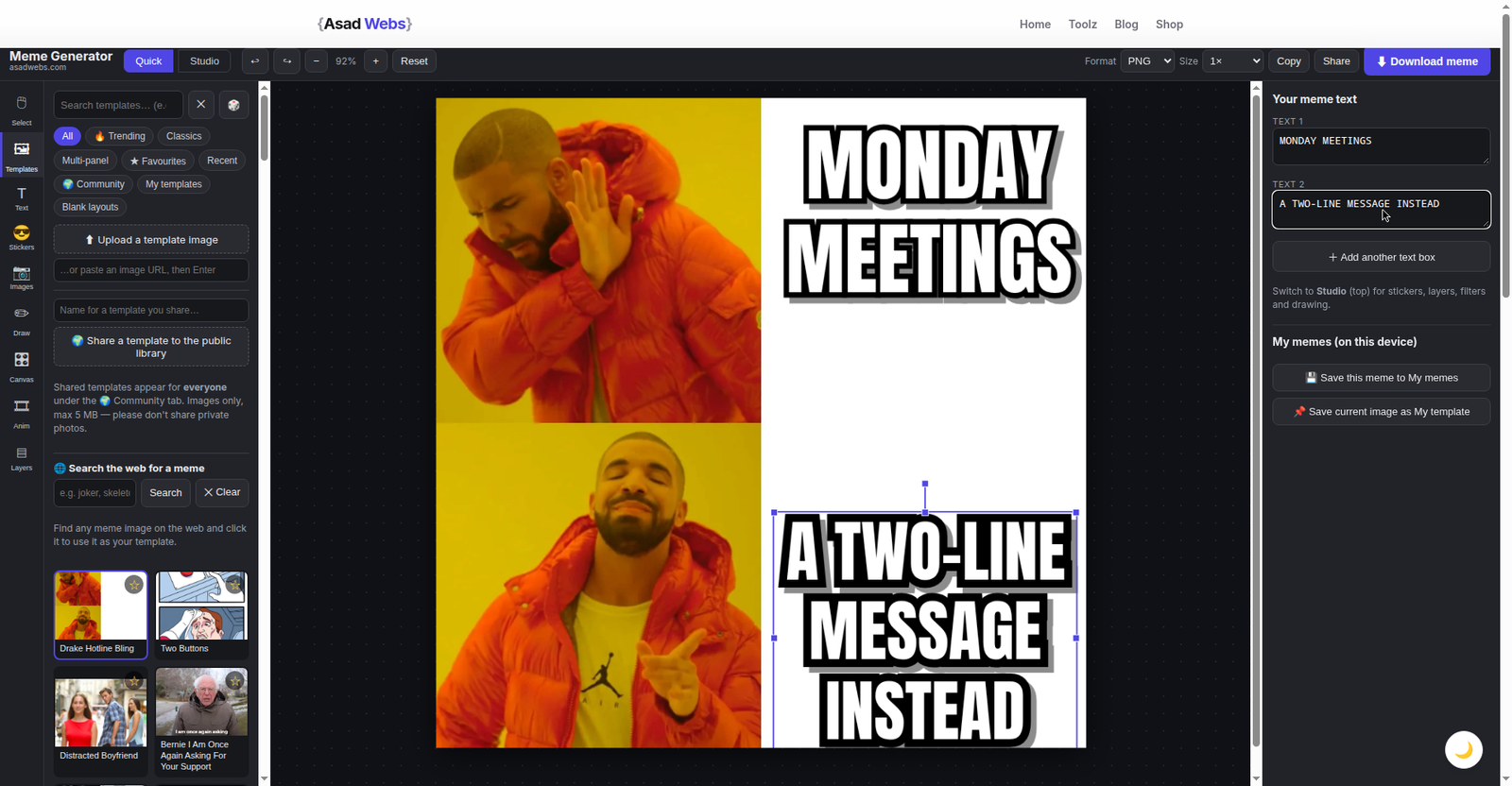
Quick mode in action: the Drake template with both captions typed in and ready to download — no account, no watermark. Click the screenshot to open the Meme Generator and make your own.
The template library: 225 formats, a searchable grid and the whole web
Most meme makers give you a short scroll of ageing templates and call it a library. This one starts from a much bigger shelf: when we tested it, the library listed 225 templates, organised so the right format takes seconds to find.
A live catalogue, plus the classics bundled in
The backbone of the library is the public Top 100 meme-template catalogue — the same ranking Imgflip publishes — refreshed live in your browser, so trending formats arrive as they climb rather than months later. On top of that, the 50 most iconic templates are bundled into the page itself, so the classics keep working with no connection at all — on a plane, or on hotel Wi-Fi that barely loads text. Drake, Distracted Boyfriend, the Expanding Brain tiers: they are simply there.
Category tabs that match how you browse
The library is split into tabs that mirror the way people actually look for a format:
- Trending — what the live catalogue says the internet is using now.
- Classics — the evergreen formats.
- Multi-panel — tier lists, comparisons and story formats.
- Favourites — star the formats you reuse; they gather here.
- Recent — the templates you opened last, so a running joke is easy to continue.
- Community — templates other people have shared publicly (images only, up to 5 MB each); you can share one of yours the same way.
- My templates — your own uploads, kept in your browser.
- Blank layouts — empty panel arrangements for building a format from nothing.
Search the library — then search the web
The grid is searchable: type a character, a show or a reaction and the matching formats filter down as you type. But the feature that removes the last dead end is the "Search the web for a meme" panel. Type a query, browse the results, and click any image — it drops straight onto the canvas as your template. No downloading the picture, no saving it to a folder, no re-uploading through a file picker: the meme you pictured is on the canvas in two clicks, ready for captions.
Every route for getting a template onto the canvas:
| Way in | How it works | Best for |
|---|---|---|
| Library search | Type in the grid's search box; formats filter down instantly | Known formats and reactions |
| Web search panel | Search the web inside the tool; click a result to use it | That one specific meme you can picture but not name |
| Upload your own image | Pick any photo or screenshot from your device | Your own photos, screenshots, product shots |
| Paste or drag & drop | Ctrl+V an image from the clipboard, or drop a file on the canvas | Something already on your screen |
| Community library | Browse templates shared publicly by other users (up to 5 MB) | Discovering formats you would never search for |
| AI generation (beta) | A sidebar entry generates a custom meme image with AI | A scene no existing template covers |
Tip: favourite the three or four formats your team or brand actually uses. The Favourites tab turns the full 225-template library into your own short shelf, and your next meme starts in seconds instead of a fresh search.
Quick mode and Studio mode: two speeds, one canvas
The generator opens in Quick mode, and for most memes that is all you need: pick a template, type into the text boxes that appear in the right places, download. The same canvas sits inside Studio mode, which unlocks the full workshop around it — Studio is Quick mode with every extra panel switched on.
| Quick mode | Studio mode | |
|---|---|---|
| Best for | A reaction meme for a chat or post, right now | Layered, polished or multi-panel memes |
| Text boxes | The template's pre-placed boxes | Unlimited — add as many as the joke needs |
| Stickers & overlays | No | Yes — stickers, emoji and your own images on top |
| Layers panel | No | Yes — reorder, hide, lock, rename, delete |
| Drawing & shapes | No | Yes — brush, highlighter, rectangle, circle, line, arrow |
| Filters | No | Yes — sliders plus B&W, Sepia, Invert and Deep Fry |
| Animated memes | No | Yes — GIF and video panel |
| Learning curve | Seconds | A few minutes, panel by panel |
Text that behaves like meme text should
Captioning is where cheap meme tools fall apart — boxes in the wrong place, type that overflows, one global style for everything. Here, picking a template places the text boxes where that format genuinely needs them: beside Drake's two panels, across the brain tiers, under the buttons. As you type, the type auto-fits instead of spilling over the artwork. Double-click any text to edit it in place; drag to move, pull the corners to resize, use the top handle to rotate.
Three presets cover the classic looks — Classic meme, Caption bar, Plain — and every box can then be styled alone:
- Eight fonts: Anton, Archivo Black, Oswald, Montserrat, Comic Neue, Arial Black, Impact and Georgia — from heavy poster lettering to the deliberately scruffy comic look.
- Size, bold, italic and all-caps toggles, with left, centre or right alignment.
- Text colour, plus a separate outline colour and width — the thick dark outline keeps white meme type readable over busy photos.
- A background box behind the text, and a shadow, for captions on cluttered images.
- Line height, letter spacing and opacity for finer control.
- Rotation in quick 15-degree steps (or free rotation), flip horizontal and flip vertical.
- Crop, duplicate, lock, and layer order — bring forward or send backward.
In Studio mode text boxes are unlimited — annotated screenshots, tier explanations and full comic strips are all fair game.
Inside Studio mode: stickers, panels, drawing, layers and filters
Studio mode wraps the canvas in tools you would otherwise open a photo editor for. Stickers and emoji drop onto the meme, and your own overlay images layer on top the same way — a logo, a product shot, a second screenshot. Multi-panel layouts add a frame below or beside the current one, same template or blank, covering comparison and before/after formats without leaving the tool.
Shapes — rectangle, circle, line and arrow — handle the pointing and circling reaction memes constantly need, and freehand drawing offers a brush plus a highlighter for marking up screenshots. Everything lands in the layers panel, where each object can be reordered, hidden, locked, renamed or deleted — the difference between a canvas you control and a pile of stickers you cannot untangle.
The canvas adapts to where the meme is going: Original, 1:1, 4:5, 9:16 and 16:9 sizes cover feed posts, portraits, stories and widescreen. Top and bottom caption bars have their own bar colour control, and a border frame finishes the classic look. Finally, filters: sliders for brightness, contrast, saturation and blur, one-click Black & White, Sepia and Invert — and a dedicated DEEP FRY button for the over-saturated, crunchy, much-reposted look in one click.
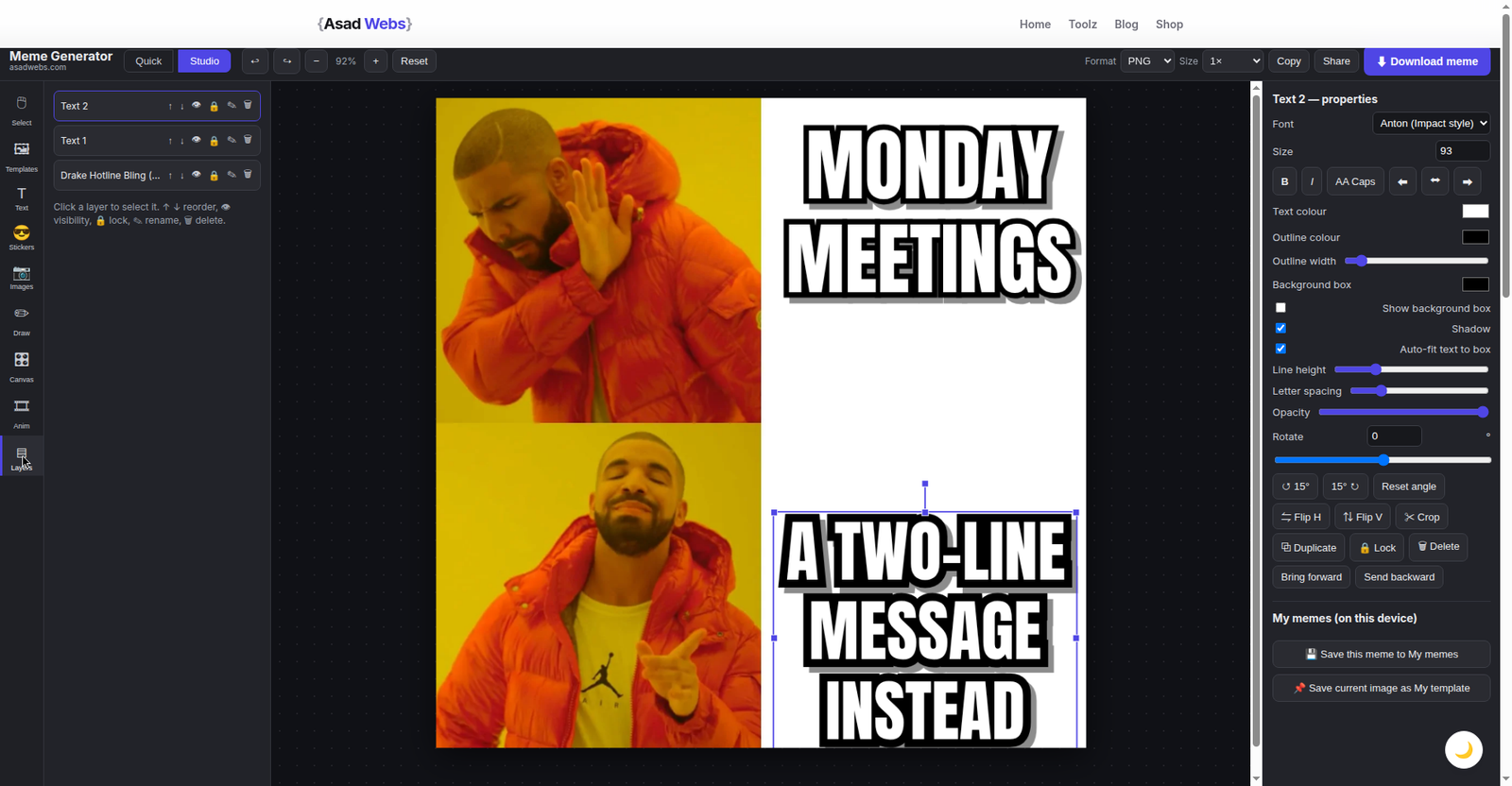
Studio mode with the layers panel open: two text layers stacked over the template layer, each ready to reorder, hide, lock or rename. Click the screenshot to open the studio.
Animated memes: caption a GIF, or trim a video clip
The Animated panel is the feature nobody expects from a free browser tool. Upload an animated GIF (up to 30 MB) and it plays on the canvas; add captions and stickers as usual, and export stamps them onto every frame of a looping GIF — or save the first frame as a still PNG.
Video works the same way. Upload an MP4, WebM or MOV clip (up to 200 MB), trim it with start and end times, place captions over the frame, and export either an MP4 with the whole layout burned in or a GIF. Exports are capped at 60 seconds, which covers reaction clips comfortably. One practical note: animated exports render entirely in your browser on a single thread, so allow roughly a minute per 10 seconds of clip and keep the tab open. Animated templates are not bundled in — famous GIF templates are other people's footage — so this panel works with GIFs and videos you bring yourself.
A worked example: the Drake meme from our test
To test Quick mode we built the most familiar format on the internet. From the library we picked Drake Hotline Bling — two panels, two pre-placed text boxes, nothing to arrange. In the top box (TEXT 1) we typed MONDAY MEETINGS, next to Drake's rejecting hand. In the bottom box (TEXT 2): A TWO-LINE MESSAGE INSTEAD, beside the approving nod. The type auto-fitted as we typed, both captions sat exactly where the format expects them, and the finished meme — the one in the preview screenshot above — was ready to download as a PNG. One search, two lines, under a minute, no watermark anywhere. We then opened the same meme in Studio and confirmed the layers panel listed both text layers over the template layer, each independently selectable.
Exporting, sharing and your saved memes
Still memes download as PNG, JPG or WebP at 1×, 2× or Original resolution, or copy straight to the clipboard or share directly. Animated work exports as GIF or MP4, as described above.
| Export | Formats | Sizes |
|---|---|---|
| Still meme | PNG, JPG, WebP | 1×, 2× or Original resolution |
| Animated GIF meme | GIF (every frame captioned), or first-frame PNG | As uploaded |
| Video meme | MP4 with layout burned in, or GIF | Up to 60 seconds |
| Quick routes | Copy to clipboard, Share | — |
Your drafts and finished pieces collect on the "My memes" shelf, saved in your own browser storage — nothing sits on a server. Download anything you want to keep permanently, because clearing your browser's site data clears the shelf with it.
Honest notes before you publish
Three things worth knowing. First, standard exports are rendered from a 900-pixel working canvas, which keeps the tool fast on any device — when you need every pixel, choose Original size at export for full template resolution. Second, the meme you make is yours to share, but the photograph inside a famous template can still belong to its photographer or studio, so think twice before a recognisable still carries a paid advertisement. Third — the good news — exports never carry a watermark, at any size, in any format.
Fully free, unlimited usage — what that actually means
"Free" on meme sites usually means a trial with the good parts locked. Here the promise is stated on the tool's own page and matched everything we saw while testing:
- No sign-up. No account, no email wall — open the page and start.
- No daily limits. No credits, no export counter, no queue — the hundredth meme works exactly like the first.
- No watermarks. Not on stills, GIFs or video exports, at any size.
- Nothing is uploaded. Your photos and clips never leave your device, and closing the tab ends the session.
The limits that do exist are physical, not commercial: GIF uploads up to 30 MB, video uploads up to 200 MB with exports capped at 60 seconds, slower animated rendering because it runs on your device, and the 900-pixel working canvas unless you choose Original.
Frequently asked questions
Is the Meme Generator really free, with no watermark?
Yes. It is fully free: no sign-up, no daily limits or credits, and no watermark on any export — stills, GIFs or video, at any size. The whole tool runs in your browser, so your images are never uploaded.
How many templates does the Meme Generator have?
The library listed 225 templates when we tested it. It is built on the live Top 100 catalogue (the same ranking Imgflip publishes, refreshed in your browser), with the 50 most iconic templates bundled into the page so they work offline — plus a Community library, your own uploads, blank layouts and a web search panel for everything else.
Can I use a meme image that is not in the library?
Yes, several ways. Open the "Search the web for a meme" panel, type a query and click any result image to drop it onto the canvas. Or upload your own image, paste one with Ctrl+V, or drag and drop a file onto the canvas.
What is the difference between Quick mode and Studio mode?
Quick mode is the fast lane: pick a template, type into its pre-placed text boxes, download. Studio mode keeps the same canvas and adds unlimited text boxes, stickers and overlays, a layers panel, multi-panel layouts, shapes, drawing, canvas sizes, filters and the Animated panel for GIF and video memes.
Can I make animated GIF or video memes?
Yes. Upload an animated GIF (up to 30 MB) and your captions are stamped onto every frame, or upload an MP4, WebM or MOV clip (up to 200 MB), trim it, and export an MP4 with the layout burned in or a GIF. Video exports are capped at 60 seconds, and rendering runs in your browser — allow roughly a minute per 10 seconds of clip.
Which export size should I choose — 1×, 2× or Original?
Standard exports are rendered from a 900-pixel working canvas at 1× or 2×, which is plenty for chats and social posts. Choose Original when you need the template's full resolution, for example for print or a large display.
Can I use these memes in paid advertising?
Your captions and layout are yours, but the photograph inside a famous template may belong to its photographer or studio. Memes made from your own photos and uploads are safe anywhere; recognisable famous stills deserve a second thought before they carry a paid ad.
Make your first meme
Open the Meme Generator and build one in Quick mode in under a minute — free, unlimited and watermark-free. And if your business needs the website itself built or rebuilt — a store, a booking system, or a custom tool of your own — book a free consultation and tell us what you are planning.
Be the first to share a useful question or thought.