
HEX, RGB, CMYK and HSL are four ways of writing down the same colour, each built for a different job. HEX is the language of web code, RGB is how screens mix colour, HSL describes colour the way humans think about it, and CMYK is the language of print. Pick the format that matches where the colour will end up: our free color picker shows every format side by side. The whole decision in one small table:
| Format | Written as | Use it for |
|---|---|---|
| HEX | #0E7C7B | Websites, CSS, sharing a colour unambiguously |
| RGB | rgb(14, 124, 123) | Screens and design tools |
| HSL | hsl(179, 80%, 27%) | Adjusting colour by eye — shades and tints |
| CMYK | cmyk(89%, 0%, 1%, 51%) | Print — brochures, packaging, business cards |
Meet the example colour: one teal, four languages
Every example in this guide uses one colour — the teal we use across Asad Webs, #0E7C7B: a deep blue-green, dark enough for buttons, bright enough to feel modern. In RGB it is 14 parts red, 124 parts green and 123 parts blue on the 0–255 scale. Notice the green and blue channels are almost equal while red is nearly absent — that is what makes it teal rather than green or blue.
One colour, four formats — teal #0E7C7B as RGB — hover or tap each bar for details.
Tool preview: one colour in every format
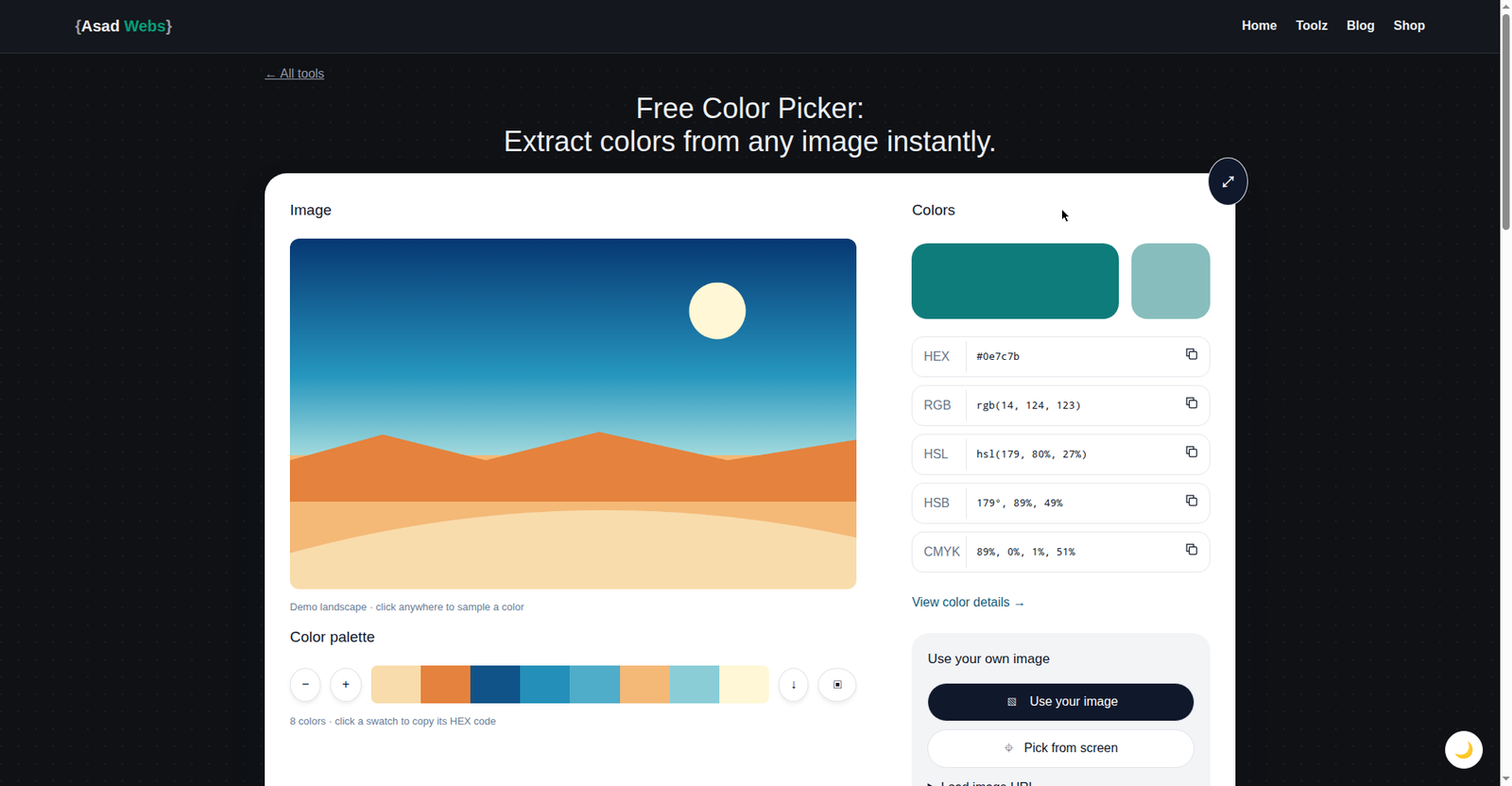
This guide's example colour, the teal #0E7C7B, inside the live colour tool — every format this article explains, shown side by side. Click the preview to inspect a colour of your own.
HEX: the language of the web
A HEX code is RGB compressed into six characters. Split #0E7C7B into three pairs — 0E, 7C, 7B — and each pair is one RGB channel written in base 16: 0E is 14, 7C is 124, 7B is 123. That is all a HEX code ever is. Browsers, CSS and design tools accept it directly, so it became the default way to pass a colour around. If someone emails you a colour for a website, it will almost always be HEX. Its only weakness: it tells you nothing about what the colour looks like at a glance.
RGB: how screens actually mix colour
Every screen pixel is three tiny lights — red, green and blue — and RGB records how bright each is, from 0 (off) to 255 (full). All three at full power make white; all off makes black. Design tools, photo editors and presentation software all work in RGB because they are built for screens. Use it when a tool asks you to set the three channels separately, or when you need transparency — the extended RGBA form adds a fourth value for opacity. Its weakness: three raw numbers are hard to reason about. Is rgb(14, 124, 123) light or dark, vivid or greyish? RGB will not tell you without practice.
HSL: the format humans think in
HSL fixes that: it describes colour the way you would out loud. Hue is the colour itself, an angle on the colour wheel (0° red, 120° green, 240° blue — teal sits at 179°). Saturation is vividness, from grey (0%) to full colour (100%); Lightness runs from black (0%) to white (100%), with the pure colour at 50%. Our teal — hsl(179, 80%, 27%) — is vivid and on the darker side. This is why designers love HSL for interfaces: keep the hue fixed and raise lightness for a hover state, or lower saturation for a muted background version — the family always matches because the hue never moves. CSS supports HSL natively, so it is practical for web work too, not just theory.
CMYK: the language of print
Printers lay down ink rather than emitting light. CMYK describes a colour as percentages of four inks — cyan, magenta, yellow and black (K, the "key" plate). Our teal prints as cmyk(89%, 0%, 1%, 51%): mostly cyan ink and black, almost no magenta or yellow. Use CMYK whenever the final product is physical, and always convert before sending files to a print shop — the conversion shifts the colour slightly, and you want to see that shift on screen first, not on 5,000 printed flyers.
The gamut warning: CMYK cannot reproduce the brightest screen colours. Vivid neons and glowing greens that look stunning in RGB will print noticeably duller — ink on paper cannot emit that much light. If a brand colour must work in both worlds, choose it inside the CMYK-safe range from the start.
The ranges trip people up first — RGB counts to 255, CMYK counts in percent:
Component ranges by format — hover or tap each bar for details. ■ maximum value per channel (each group scaled to its own maximum: RGB 0–255, CMYK 0–100).
Converting between formats by hand
The color picker converts instantly, but one worked example makes all four formats click. HEX to RGB you have already seen: split into pairs and convert each from base 16 (0E = 14, 7C = 7×16 + 12 = 124, 7B = 7×16 + 11 = 123). RGB to HSL: the strongest channel is green (124) and the weakest is red (14); lightness is their midpoint, (124 + 14) ÷ 2 ÷ 255 ≈ 27%, and because green just edges out blue, the hue lands at 179°, with 80% saturation. RGB to CMYK: black (K) is whatever light is missing from the brightest channel — (255 − 124) ÷ 255 ≈ 51%. The inks are then measured against that brightest channel: cyan = (124 − 14) ÷ 124 ≈ 89%, magenta = (124 − 124) ÷ 124 = 0%, yellow = (124 − 123) ÷ 124 ≈ 1%. Result: cmyk(89%, 0%, 1%, 51%) — the same teal, ready for a printer.
Second Worked Example: A Warm Coral, All Four Formats
One more colour, start to finish, so the conversions stop being the teal's party trick. Take a warm coral, #D95D39. HEX to RGB: split the pairs — D9 is 9 + 13×16 = 217, 5D is 93, 39 is 57 — so rgb(217, 93, 57). Red dominates, blue is weakest: an orange-red, as coral should be. RGB to HSL: the strongest channel is red (217) and the weakest blue (57); lightness is their midpoint, (217 + 57) ÷ 2 ÷ 255 ≈ 54%; because red leads, the hue is 60 × (93 − 57) ÷ (217 − 57) ≈ 14° — just past red, into orange; and the wide gap between strongest and weakest channels means high saturation, about 68%. So hsl(14, 68%, 54%): a vivid colour at middling lightness, the opposite profile from our dark teal.
RGB to CMYK: black is the light missing from the brightest channel — (255 − 217) ÷ 255 ≈ 15%. Measured against red at 217: cyan = (217 − 217) ÷ 217 = 0%, magenta = (217 − 93) ÷ 217 ≈ 57%, yellow = (217 − 57) ÷ 217 ≈ 74%. Result: cmyk(0%, 57%, 74%, 15%) — no cyan at all, which is precisely what makes it warm: presses build coral from magenta and yellow heat over a little black. Same routine, every colour: split, compare channels, measure against the strongest.
Which format for common tasks
| Task | Format | Why |
|---|---|---|
| Styling a website in CSS | HEX (or HSL) | Compact and universal; HSL for shade variations |
| Picking colours in a design tool | RGB / HEX | Screens are RGB devices |
| Creating a hover or disabled shade | HSL | Change only lightness; hue stays matched |
| Making a vivid colour more muted | HSL | Lower saturation only |
| Printing flyers, cards or packaging | CMYK | The press lays down these four inks |
| Sending a colour to a developer | HEX | Short and unambiguous |
| Matching a colour sampled from a photo | HEX / RGB | What pickers read from a pixel |
| A logo used on screen and in print | HEX master + CMYK version | Keep both; approve print on a proof |
Alpha: The Extra Value Nobody Ordered
Three of the four formats have a variant that adds alpha — transparency. RGB becomes RGBA with a fourth value from 0 (invisible) to 1 (fully solid). HSL becomes HSLA the same way. And HEX grows from six digits to eight: #0E7C7BCC is our teal with CC — 204 out of 255, or 80% — opacity, so whatever sits behind it shows through by a fifth.
Alpha matters anywhere colours layer: a tinted overlay dimming a photograph, a shadow, a button wash over an image. It is a screen concept only — print has no transparency value, because ink on paper is simply there or not there; a design that relies on alpha must be flattened to a solid colour before it can be printed. And when a tool shows you a colour with an unexpected eight-digit code or a decimal fourth value, you are not looking at a new colour — you are looking at an old one, partly see-through.
Common mistakes
Most colour-format problems come from a few mix-ups. Sending an RGB file to print without converting, then wondering why the brochure looks dull — the gamut problem above, and it is avoidable. Typing the same numbers into a different format: 124 means "about half" in RGB but an impossible 124% in CMYK — numbers are never portable between formats. An eight-digit HEX is not a typo — it adds an alpha (transparency) channel that some tools misread. And judging print on a backlit screen — paper has no backlight, so proof anything important.
The one-line summary: screens speak HEX and RGB, humans think in HSL, printers need CMYK. Describe the colour in the language of wherever it will appear, and let a converter translate.
Naming and Saving Your Brand Colours
However fluently you convert, the practical habit that saves businesses from colour chaos is a written record. For each brand colour, save all four formats side by side — HEX for the web team, RGB for slides and documents, HSL for whoever adjusts shades, CMYK for the printer — along with a plain name. A colour recorded once, in every language it will be spoken in, never has to be re-sampled from a screenshot or guessed from memory, which is where drift and near-miss shades creep in. Once the colours are recorded, the next step is combining them well: our guide to choosing a website colour palette turns individual brand colours into a scheme that still looks professional.
The record takes minutes per colour with a converter, and it is the difference between "the teal" meaning one exact colour everywhere and meaning five similar teals in five places. If your colours currently live in scattered files and inboxes, gathering them into one small table is the highest-value colour task on this page.
Try it with your own brand colour: pick it with the free color picker and read off all four formats at once. Preparing web graphics in your new colours? Convert them with the image to WebP converter, check your page's presentation with the meta tag analyzer, and find more guides on the Asad Webs blog.
Struggling to keep brand colours consistent between screen and print? Book a free consultation — we build brand and website colour systems with HEX, RGB and CMYK values documented properly from the start.
Frequently Asked Questions
Is HEX the same thing as RGB?
Yes. A HEX code is RGB written in base 16: #0E7C7B and rgb(14, 124, 123) are exactly the same colour — HEX is just more compact.
Why does my printed colour look different from my screen?
Because CMYK's gamut is smaller than RGB's, especially for bright colours. Out-of-range colours get pulled to the nearest printable equivalent, which looks duller. Convert early and proof on paper.
Which format do printers actually want?
CMYK. Print files (usually PDF) are expected to carry CMYK colours; send RGB and the shop converts it for you, without your input on the shift.
If screens use RGB, what is HSL for?
For humans. HSL reorganises the same colours by hue, saturation and lightness, so adjusting a colour becomes intuitive — and tools convert it back to RGB behind the scenes.
How do I convert a colour quickly?
Use a tool: enter the colour in the free colour picker and it shows all four formats together, ready to copy.
What is an eight-digit HEX code?
A six-digit HEX colour plus two more digits for alpha — transparency. #0E7C7BCC is the teal from this guide at CC opacity, and CC is 204 out of 255, about 80% solid. Most tools that do not expect the alpha digits will misread the colour, so use eight digits only where transparency is genuinely supported.
Why do two tools show slightly different CMYK values for the same colour?
Because the conversion depends on the print profile and rounding each tool assumes — different ink models of the same colour can both be valid. Differences of a percent or two are normal. What matters is consistency: pick one tool's values, record them as your brand's standard, and give printers those, rather than re-converting in a different tool each time.
Be the first to share a useful question or thought.