
As an Amazon Associate, I earn from qualifying purchases made through links on this page — at no extra cost to you.
A developer's monitor is where the working day happens. Code, browser, design tool, terminal — all of it lives on that screen for eight hours or more. A bad monitor means tired eyes and fuzzy text; a good one means sharp code, accurate colours, and a single cable that charges your laptop while it drives the display. This guide compares six monitors that are actually good for web development and design in 2026, from a premium 4K Thunderbolt display to a portable second screen. Every pick is sold on Amazon, every strength and weakness is stated plainly, and prices are never quoted as fixed numbers here — they move daily, so each link goes to the live Amazon listing where you can check the current price.
How to choose a monitor for development and design
Resolution first. For code, sharpness is everything. A 27-inch 4K display renders text crisply enough to read small fonts all day; a 27-inch 1080p display does not, and your eyes will notice by lunchtime. If you can only afford one upgrade, buy resolution before size.
Colour accuracy second — if you design. Pure developers can live with a standard sRGB panel. Designers need wide colour gamut (99% DCI-P3 or 99% Adobe RGB) and factory calibration with a Delta E under 2, which means the colours on screen match the colours your users see. The first three picks below are calibrated for exactly that.
USB-C with power delivery third. One cable that carries video, data, and up to 90W or more of charging turns a laptop into a desktop the moment you sit down. It is the single biggest quality-of-life feature in this list, and four of the six picks have it.
Size and shape fourth. 27 inches is the sweet spot for most desks. A 34-inch ultrawide replaces two monitors for IDE plus browser plus terminal side by side. A portable 15.6-inch screen is for working away from the desk. There is no wrong answer — only the shape that fits your desk and your workflow.
The six monitors at a glance
Ratings below are Amazon customer ratings read on 18 November 2026, except where the table says otherwise. Where no rating is shown, no Amazon rating could be verified for that listing — that is stated, not hidden.
| Monitor | Size / resolution | Panel | USB-C charging | Rating |
|---|---|---|---|---|
| Dell UltraSharp U2725QE | 27" 4K UHD | IPS Black, 120Hz | Thunderbolt 4, 140W | Not yet rated on Amazon |
| ASUS ProArt PA279CRV | 27" 4K UHD | IPS, 60Hz | USB-C, 96W | 4.3 stars (441) |
| LG UltraFine 27UP850-W | 27" 4K UHD | IPS, 60Hz | USB-C, 96W | 4.3 stars (335) |
| LG UltraWide 34U650A-B | 34" 3440x1440 | IPS curved, 100Hz | USB-C, 96W | Not yet rated on Amazon |
| ASUS VA27EHF | 27" Full HD | IPS, 100Hz | No USB-C | 4.6 stars (386) |
| ASUS ZenScreen MB16ACV | 15.6" Full HD | IPS portable, 60Hz | USB-C, single cable | 4.5 stars (983) |
1. Dell UltraSharp 27 4K Thunderbolt Hub Monitor U2725QE — the premium pick
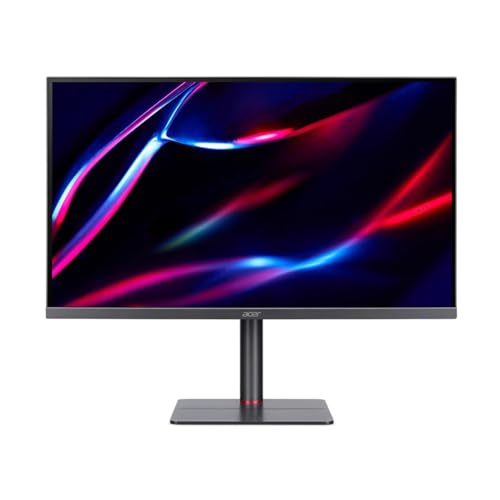
The U2725QE is the successor to Dell's long-running UltraSharp 4K line, and it is the best single monitor in this list. A 27-inch 4K IPS Black panel at 120Hz, factory-calibrated to 99% DCI-P3 with a Delta E under 1.5, 450 nits of brightness, DisplayHDR 600, and a 3000:1 contrast ratio — that combination means sharp text, deep blacks in dark mode, and colours a designer can trust. The Thunderbolt 4 hub delivers up to 140W of charging over one cable, so a laptop docks with a single plug. Multiple 2026 roundups name it a top pick among 4K monitors.
Who it is for: developers and designers who want one monitor that does everything — sharp code, accurate colour, and a full docking hub — and who are willing to pay for it.
Pros: sharpest text and best contrast here (IPS Black, 3000:1); 120Hz smoothness; 99% DCI-P3, factory-calibrated; Thunderbolt 4 hub with 140W charging; DisplayHDR 600.
Cons: the most expensive pick in this list; no Amazon customer rating could be verified for this listing, so check the live listing and recent reviews before buying; 27 inches is the limit — if you want more width, see the ultrawide below.
Check the current price on Amazon — Dell UltraSharp 27 4K Thunderbolt Hub Monitor U2725QE
2. ASUS ProArt Display PA279CRV — the designer-value pick

The ProArt PA279CRV gives you factory-calibrated wide colour gamut at well under the Dell's price: 27-inch 4K, 99% DCI-P3, 99% Adobe RGB, 100% sRGB, Delta E under 2, Calman Verified, and HDR10 with DisplayHDR 400. A USB-C port delivers 96W of charging, and DisplayPort daisy-chaining lets you run a second monitor from the first. With 4.3 stars from 441 Amazon ratings, it is a proven choice for designers who need colour they can trust without paying for a Thunderbolt hub.
Who it is for: designers and front-end developers who work with colour every day and want a calibrated 4K panel at a sensible price.
Pros: full wide gamut (DCI-P3 and Adobe RGB) with factory calibration; Calman Verified; USB-C 96W single-cable docking; DisplayPort daisy-chain; strong rating base.
Cons: 60Hz only — fine for design and code, not for high-refresh work; no Thunderbolt, so no 140W charging or Thunderbolt daisy-chaining; the stand is functional rather than premium.
Check the current price on Amazon — ASUS ProArt Display PA279CRV, 27-inch 4K
3. LG UltraFine 27UP850-W — the same 4K sharpness for less

The LG 27UP850-W is the value way to get a 27-inch 4K panel with 96W USB-C docking: 3840x2160, 95% DCI-P3, 99% sRGB, DisplayHDR 400, and 400 nits. With 4.3 stars from 335 Amazon ratings, it is a well-reviewed monitor that costs roughly two hundred dollars less than the premium picks while giving you the same sharp text and the same one-cable laptop connection. Buy two and you have a dual 4K setup for less than one premium display.
Who it is for: developers who want 4K sharpness and USB-C docking on a smaller price — and anyone building a dual-monitor setup.
Pros: same 4K sharpness and 96W docking as the premium picks for less money; 95% DCI-P3 is plenty for web work; height, tilt, and pivot stand; the sensible dual-monitor buy.
Cons: LG lists this model as discontinued in some regions, and a successor (LG 27UP850K-W) exists — it was still sold on Amazon.com as of 18 November 2026, but check stock and the seller on the live listing; 60Hz only.
Check the current price on Amazon — LG UltraFine 27UP850-W, 27-inch 4K
4. LG UltraWide 34U650A-B — the ultrawide that replaces two monitors

A 34-inch ultrawide at 3440x1440 replaces a dual-monitor setup with one curved panel and no bezel in the middle: IDE on the left, browser in the centre, terminal on the right. The 34U650A-B is a curved IPS panel at 100Hz with HDR10, 99% sRGB, USB-C with 96W power delivery, a built-in speaker, and a fully adjustable stand. It was in stock on Amazon as of 17 November 2026. IPS (not VA) means consistent colour and wide viewing angles, which is what you want when the screen is this wide.
Who it is for: developers who live in three windows at once and hate the bezel gap of two monitors — and designers who want a wide canvas with honest IPS colour.
Pros: one screen replaces two; IPS colour stays consistent across the whole wide panel; USB-C 96W charging; 100Hz smooth scrolling; built-in speaker; adjustable stand.
Cons: 3440x1440 is less sharp per inch than 4K, so text is softer than on the 27-inch 4K picks above; the curve takes a day to get used to; no Amazon customer rating could be verified for this listing, so check the live listing before buying.
Check the current price on Amazon — LG UltraWide 34U650A-B, 34-inch 3440x1440 IPS Curved
5. ASUS VA27EHF — the cheapest comfortable 27-inch screen for coding

If the price of 4K is out of reach, the VA27EHF is the honest value choice: a 27-inch IPS panel at 100Hz with a 1ms response time, Adaptive-Sync, and TUV Rheinland Flicker-Free and Low Blue Light certification — the eye-care features that matter for long sessions. With 4.6 stars from 386 Amazon ratings, it is the best-rated monitor in this list. The trade-off is plain: 1080p at 27 inches is about 82 pixels per inch, so text is visibly softer than on the 4K picks. If your work is mostly code and your eyes are the priority, the size and the smoothness are worth it; if you read small text all day, save for a 4K panel instead.
Who it is for: developers on the smallest price who want a big screen, smooth scrolling, and eye comfort — and anyone setting up a second or third monitor.
Pros: best Amazon rating in this list (4.6 stars, 386 ratings); 100Hz smooth scrolling; eye-care certified; frameless design; VESA-mountable.
Cons: 1080p at 27 inches means soft text — the real compromise here; no USB-C, so a separate cable and charger are needed; tilt-only stand; ASUS does not publish a colour-gamut figure for this model, so do not buy it for colour-critical design work.
Check the current price on Amazon — ASUS VA27EHF Eye Care Monitor, 27-inch Full HD 100Hz
6. ASUS ZenScreen MB16ACV — a true one-cable second screen

The ZenScreen MB16ACV is a 15.6-inch Full HD portable monitor that runs on a single USB-C cable — power and video together, no separate adapter, no HDMI needed. Put code on one display and the preview or documentation on the other, anywhere: a cafe, a client's office, a train. With 4.5 stars from 983 Amazon ratings, it is a proven travel companion. At 250 nits it is dim in bright rooms and useless outdoors, and there are no speakers — but as a second screen for a laptop, it is the simplest setup in this list.
Who it is for: developers who work away from their desk and want a second screen without carrying a power brick.
Pros: one USB-C cable does everything; light and genuinely portable; kickstand included; eye-care certified; strong rating base (4.5 stars, 983 ratings).
Cons: 250 nits is dim in bright rooms; no HDMI and no speakers, so it only works with USB-C video output; ASUS does not publish an sRGB figure for this model, so do not buy it for colour work.
Check the current price on Amazon — ASUS ZenScreen MB16ACV Portable Monitor, 15.6-inch Full HD
Which monitor should you buy?
Best overall: the Dell U2725QE. Sharpest text, best contrast, 120Hz, and a Thunderbolt hub in one box.
Best for designers on a smaller price: the ASUS ProArt PA279CRV. Full wide gamut and factory calibration for well under the Dell.
Best value 4K: the LG 27UP850-W. Same sharpness and USB-C docking for less — and buy two for a dual setup.
Best for multitasking: the LG 34U650A-B ultrawide. Three windows side by side, no bezel in the middle.
Smallest price: the ASUS VA27EHF. A big, smooth, comfortable screen — just accept the softer 1080p text.
Best second screen: the ASUS ZenScreen MB16ACV. One cable, anywhere.
Frequently asked questions
Is 4K worth it for coding? Yes, at 27 inches. Text rendering is the difference you feel every hour: 4K at 27 inches is about 163 pixels per inch, while 1080p at 27 inches is about 82. The 4K picks in this list are the ones to buy if you read code all day.
Do I need USB-C on a monitor? If you use a laptop as your main machine, yes — one cable for video, data, and charging is the single biggest desk upgrade in this list. Desktop-only setups can skip it.
Ultrawide or two monitors? An ultrawide is cleaner and has no bezel gap, but two 27-inch 4K monitors give you more total pixels and let you angle each screen. If you mostly work in three windows, the ultrawide wins; if you want maximum sharpness, buy two 4K panels.
Do prices on Amazon change often? Yes — daily, and sometimes sharply during sale events. That is why this article never quotes a fixed price. Use the links above to check the current price on Amazon at the moment you buy.
Need a developer for your own project?
A good monitor makes your work easier; a good developer makes your product real. If you are planning a website, a web application, or an e-commerce store, Asad Webs builds Laravel, WooCommerce, and Next.js applications for clients in the UAE, Saudi Arabia, Spain, and the USA — from the first wireframe to launch and beyond. Get in touch for a free consultation and tell us what you are building.


Be the first to share a useful question or thought.