
To calculate UK VAT, decide first whether your price is net (before VAT) or gross (VAT included). To add VAT to a £1,000 net price at the 20% standard rate, multiply by 1.2: £1,000 × 1.2 = £1,200, so the VAT is £200. To remove VAT from a £1,200 gross price, divide by 1.2: £1,200 ÷ 1.2 = £1,000 net, with £200 of VAT inside the price. The UK's rates are 20% standard, 5% reduced and 0% zero-rated. The free UK VAT Calculator runs both directions instantly. General information only — not financial advice, and not tax advice.
Tool Preview: The UK VAT Calculator In Use
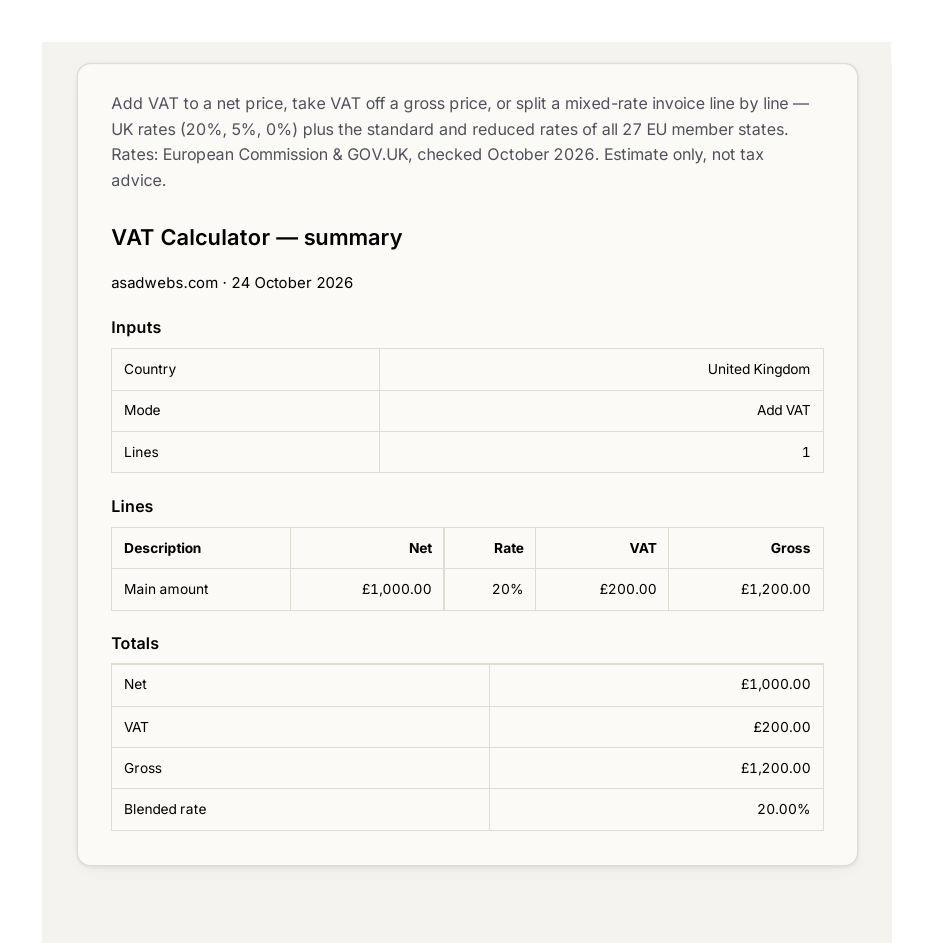
The calculator running Add VAT on £1,000 net at the UK's 20% standard rate — £200.00 of VAT added, £1,200.00 gross. Click the image to open the live tool.
The screenshot shows the tool exactly as you will use it. It ships with the UK's rates and 27 EU country rates built in, so you can price work for clients across Europe without looking anything up. You can enter several line items at different rates — the way a real invoice looks — and the tool lays the result out as an invoice-style summary: net, VAT added, gross, the blended rate and the VAT share of the gross. The walkthrough below follows the same two directions the tool offers: Add VAT (net to gross) and Remove VAT (gross to net).
The Three UK VAT Rates: 20%, 5% and 0%
The UK has three VAT rates, and most calculation errors come from applying the wrong one. The standard rate of 20% covers most goods and services you will ever invoice for: electronics, clothing, restaurant meals, hotel stays, professional services, software and trades work. If you are unsure which rate applies, 20% is the default assumption — but always check, because the exceptions are common.
The reduced rate of 5% applies to a specific list, including domestic fuel and power, children's car seats, mobility aids for people over 60 and some energy-saving materials. It exists to make essentials cheaper, and quoting 20% on a reduced-rate item overcharges your customer by 15% of the net price — on a £1,000 job, that is a £150 mistake.
The zero rate of 0% typically covers most food sold in shops (not restaurant meals), children's clothes, books and newspapers. Zero-rated is not the same as exempt: zero-rated means VAT is charged at 0% and you can still reclaim VAT on your costs; exempt means no VAT applies at all and you cannot reclaim it. For calculation purposes they look the same — gross equals net — but for your records they are different.
Using the UK VAT Calculator, Step by Step
The UK VAT Calculator handles both directions. Here is how to use it well:
- Choose your direction first. Select Add VAT when your price is net and you need the gross figure for a customer quote. Select Remove VAT when you have a gross price — a receipt, a supplier quote — and need the net figure and the VAT inside it.
- Pick the country and rate. For UK work choose 20%, 5% or 0%. Pricing for a client in another EU country? Choose their rate from the 27 built-in EU rates instead of guessing.
- Enter the price on the right base. In Add VAT mode the field expects the net price; in Remove VAT mode it expects the gross price. Double-check which one you have before typing.
- Add line items for mixed invoices. If your invoice has items at different rates — say, standard-rated labour plus reduced-rate materials — enter them as separate lines and let the tool total each rate's VAT.
- Read the invoice-style summary. Net, VAT added, gross, the blended rate across your lines and the VAT share of the gross are all shown. Copy the figures straight onto your quote or invoice.
The Formula in Plain Language
Adding VAT means scaling the net price up by the rate. The formula is gross = net × (1 + rate). At 20%, that is × 1.2; at 5%, × 1.05; at 0%, × 1.0, which leaves the price unchanged. So £1,000 net at 20% becomes £1,000 × 1.2 = £1,200, and the VAT added is £1,200 − £1,000 = £200.
Removing VAT means scaling the gross price back down to the net. The formula is net = gross ÷ (1 + rate). At 20%, that is ÷ 1.2: £1,200 ÷ 1.2 = £1,000 net, and the VAT inside the price is £1,200 − £1,000 = £200. Notice the two directions are exact inverses — adding then removing returns you to the starting figure.
The classic trap is removing VAT by subtracting 20% from the gross: £1,200 × 0.8 = £960. That is wrong, because the 20% rate was charged on the net, not the gross. The VAT inside a £1,200 gross price is £200, which is 16.67% of the gross — not 20%. If your mental maths ever lands on "just take 20% off," stop: divide by 1.2 instead.
The 1.2 shortcut: memorise two numbers and you rarely need a calculator for 20% VAT. Multiply by 1.2 to add it; divide by 1.2 to strip it. For the 5% reduced rate the pair is 1.05; for the zero rate the price simply does not change.
Worked Example: £1,000 Net at the Three UK Rates
Take one £1,000 net price and run it through all three UK rates in Add VAT mode. These are the exact figures the tool produces:
| Rate | VAT added | Gross price | VAT share of gross |
|---|---|---|---|
| 20% standard | £200.00 | £1,200.00 | 16.67% |
| 5% reduced | £50.00 | £1,050.00 | 4.76% |
| 0% zero-rated | £0.00 | £1,000.00 | 0% |
The 20% line is worth studying. The tool reports a blended rate of 20.00% and a VAT share of gross of 16.67% — £200 of VAT inside a £1,200 gross price. Those two numbers describe the same tax from different sides: 20% is the rate charged on the net, 16.67% is what that tax represents once it is folded into the gross. Both are correct; they just answer different questions.
Now the reverse check, in Remove VAT mode: enter £1,200 gross at 20% and the tool returns £1,000.00 net with £200.00 of VAT inside — the exact mirror of the Add VAT result. If your own maths ever gives a different pair, you mixed up the base or the direction.
VAT added to a £1,000 net price at the three UK rates — hover or tap each bar for details.
The chart makes the rate gap visible at a glance: the standard rate adds four times the tax of the reduced rate on the same £1,000 base, and the zero rate adds nothing. When a supplier quotes you a gross price and you are not sure which rate was used, Remove VAT mode with each rate will show you which net figure looks right.
Common Mistakes That Cost Real Money
1. Removing VAT by subtracting 20% from the gross. £1,200 × 0.8 = £960 is £40 short of the true £1,000 net. On a £120,000 annual turnover, repeating that error misstates your net by £4,000. Always divide by 1.2.
2. Feeding the tool the wrong base. Typing a gross price into Add VAT mode compounds the tax — the tool adds 20% to a price that already contains it. Check net vs gross before you type.
3. Charging 20% on everything. Food, children's clothes, books and domestic fuel sit at 0% or 5%. A blanket 20% overcharges customers and can cause awkward corrections on invoices.
4. Quoting consumers prices without VAT. In the UK, prices shown to consumers must generally include VAT where it applies. Trade quotes can show net plus VAT, but a retail price tag should be the gross figure.
5. Treating the calculator as a tax return. The tool is an estimate for quotes, invoices and planning. Your actual VAT position — registration, flat-rate schemes, partial exemption — is a matter for HMRC guidance or your accountant.
Quoting UK work and need the numbers to look right? If VAT, pricing pages and invoice layouts are part of a bigger website project, talk to us — we build business websites with clear pricing, quote tools and contact flows that convert.
Frequently Asked Questions
How do I add 20% VAT to a price?
Multiply the net price by 1.2. A £1,000 net price becomes £1,000 × 1.2 = £1,200 gross, with £200 of VAT added. For the 5% reduced rate, multiply by 1.05; at the 0% zero rate the price does not change.
How do I remove VAT from a gross price?
Divide the gross price by 1.2 at the standard rate. A £1,200 gross price gives £1,200 ÷ 1.2 = £1,000 net, with £200 of VAT inside the price. Do not subtract 20% from the gross — that gives £960, which is wrong.
What is the difference between the 5% and 0% VAT rates?
Both mean less or no VAT charged, but they apply to different things. The 5% reduced rate covers items like domestic fuel and power, children's car seats and some energy-saving materials. The 0% zero rate typically covers most shop-bought food, children's clothes, books and newspapers — VAT is recorded at 0% and you can still reclaim VAT on related costs.
Do I need to charge VAT on my invoices?
Only if your business is VAT-registered. HMRC sets a registration threshold based on taxable turnover, and it changes from time to time — check HMRC's current guidance or ask your accountant whether you need to register. Below the threshold you neither charge VAT nor reclaim it.
Why does the tool show VAT as 16.67% of the gross price?
Because the 20% rate is charged on the net price, not the gross. £200 of VAT inside a £1,200 gross price is 200 ÷ 1200 = 16.67%. Both numbers describe the same tax: 20% of the net, 16.67% of the gross.
Can I calculate VAT for EU countries with the same tool?
Yes. The calculator ships with the UK's rates and 27 EU country rates built in. Pick the country and rate, choose Add or Remove VAT, and enter the price — useful when you quote work for clients elsewhere in Europe.
Is the calculator's result official enough for my tax return?
No — it is an estimate for quotes, invoices and planning. Your actual VAT liability depends on registration status, schemes and adjustments the tool cannot know. Treat the figures as a starting point and confirm them with HMRC guidance or your accountant. This article is general information, not tax advice.
The same net-to-gross logic applies to US-style sales tax — see our guide on how to calculate sales tax — and if you are pricing work for clients, our guide to how to calculate a discount shows how stacked offers change the final price. For instant answers on any UK price, the UK VAT Calculator is free to use.
Be the first to share a useful question or thought.