
You can create a professional invoice online for free with the Invoice Generator: fill in your business and client details, add line items with quantities and rates, set the tax rate and any discount, and export a clean PDF. Here is a real example it produces — "Sample Studio" invoicing "Example Ltd" for "Website design — 5 pages" × 1 @ £1,850 with 20% VAT: subtotal £1,850.00, VAT (20%) £370.00, total due £2,220.00, invoice INV-001, issued 24 October 2026, due 7 November 2026. General information only — not financial advice.
A good invoice does two jobs at once: it asks for money clearly enough to be paid quickly, and it keeps records clean enough for tax time. This guide walks through every field in the generator, explains what a valid invoice must contain, and shows the payment-term habits that get invoices paid on time — using the INV-001 example end to end.
Tool Preview: The Invoice Generator In Use
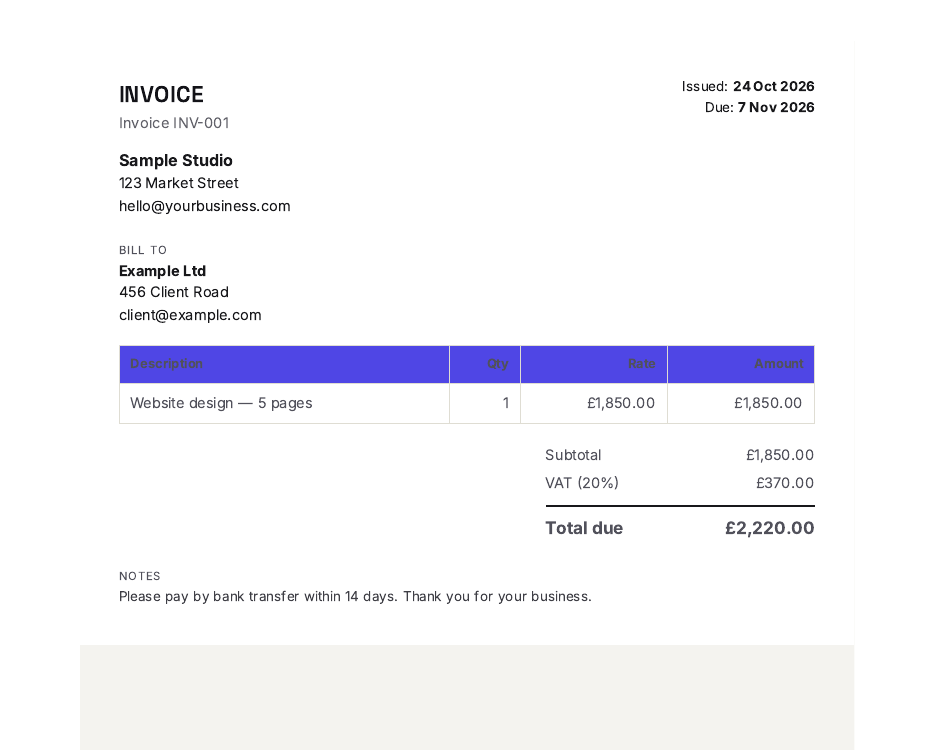
The Invoice Generator in use: invoice INV-001 for Example Ltd — subtotal £1,850.00, 20% VAT £370.00, total due £2,220.00.
Creating Your Invoice, Step by Step
- Enter your business details. Your business name, address and contact details go at the top — in our example, "Sample Studio". Add your logo with the logo upload so the invoice looks like it came from you, not from a template.
- Add the client. The client's name and address — "Example Ltd" here. Always invoice the legal entity you are contracted with, not just a contact name; mismatches slow payment.
- Set the invoice number. Every invoice needs a unique, sequential number — ours is INV-001. Never reuse or skip numbers; see the numbering discipline section below.
- Choose the currency. Pick your currency from the list, or type a custom one if yours is not there — the £ in our example comes from selecting GBP.
- Set the issue and due dates. Issue date 24 October 2026; due date 7 November 2026. The quick buttons add +7, +14 or +30 days to the issue date automatically — ours is +14.
- Add line items. Description, quantity and rate for each: "Website design — 5 pages", quantity 1, rate £1,850. Specific line items get paid faster than vague ones (more on that below).
- Set the tax. Name it ("VAT") and enter the percentage (20%). The generator computes £370.00 on the £1,850.00 subtotal. If you are not tax-registered, leave it at zero — never invent a tax line.
- Apply discounts if agreed. Enter a percentage or a flat amount — the tool supports both. Our example has no discount, so the line stays at £0.
- Record any amount already paid. If the client paid a deposit, enter it here so the balance reflects what is genuinely still owed.
- Add notes and export the PDF. Use notes for payment details — bank transfer reference, payment link, late-payment terms. Then export the professional PDF and send it.
The Formula in Plain Language
An invoice is five lines of arithmetic, always in this order:
Subtotal = sum of (quantity × rate) for every line. Tax = (subtotal − discount) × tax rate. Total = subtotal − discount + tax. Balance due = total − amount paid.
Order matters: discounts come off before tax, so the tax is charged on the discounted amount — charging tax on the pre-discount total overstates what the client owes. For INV-001 the walk is short: 1 × £1,850 = £1,850.00 subtotal; no discount; £1,850.00 × 20% = £370.00 VAT; £1,850.00 + £370.00 = £2,220.00 total due; nothing paid yet, so the balance due is the full £2,220.00.
| Line | Maths | Amount |
|---|---|---|
| Website design — 5 pages × 1 | 1 × £1,850 | £1,850.00 |
| Subtotal | Sum of lines | £1,850.00 |
| VAT (20%) | £1,850.00 × 0.20 | £370.00 |
| Discount | None agreed | £0.00 |
| Amount paid | No deposit taken | £0.00 |
| Total due | £1,850.00 + £370.00 | £2,220.00 |
The reconciliation to check on every invoice you send: subtotal − discount + tax − paid = total due. £1,850.00 − £0.00 + £370.00 − £0.00 = £2,220.00. ✓ For the two directions of tax maths in general — adding tax to a net price and extracting it from a tax-inclusive one — our guide to how to calculate sales tax covers both methods, and how to calculate a discount handles the percentage-off line.
What a Valid Invoice Must Contain
Exact requirements vary by country and by whether you are VAT-registered, but the fields below are the practical core that accountants and tax authorities everywhere expect. Treat any missing one as a defect:
| Field | Why it matters |
|---|---|
| Unique invoice number | Links the payment to the work; required for your records and the client's bookkeeping |
| Issue date | Starts the payment clock; tax point for VAT purposes in many systems |
| Due date | An invoice with no due date is a suggestion, not a demand — always set one |
| Your business details | Name, address and contact — the client needs to know exactly who is asking |
| Client details | The legal entity being billed, so their accounts team can match and approve it |
| Line items | Description, quantity and rate per line — the evidence for the total |
| Tax name and rate | What the tax is and the percentage applied; zero if none applies |
| Discount (if any) | Shown as its own line, percentage or flat, so the maths is auditable |
| Total and balance due | The headline figures — total, amount paid, and what remains |
| Payment instructions | How to pay and where to send it — bank details, link or reference in the notes |
What slows an invoice down (illustrative figures) — hover or tap each bar for details.
The chart is deliberately labelled illustrative — the pattern it shows is the point, not the precise day counts. A missing due date is the worst defect because it gives the client's accounts team no deadline to miss; vague line items invite queries ("what is this for?") that restart the approval clock; a missing payment method turns approval into a second round of emails. INV-001 avoids all three: due 7 November 2026, a specific line item, and payment instructions in the notes.
Numbering Discipline: Boring, and That Is the Point
Invoice numbers must be unique and sequential: INV-001, INV-002, INV-003, with no gaps and no repeats. Gaps look like missing invoices to an accountant (or a tax inspector); repeats break the link between payments and work. Pick a scheme once — INV-2026-001 for year-prefixed, or plain INV-001 as in our example — and never deviate. The generator's invoice-number field is free text, so the discipline is yours: decide the scheme before the first invoice, not after the tenth.
Payment Terms That Get You Paid
Always set a due date. The +7 / +14 / +30 quick buttons exist because explicit terms beat implied ones every time. Fourteen days, as in INV-001 (24 October → 7 November), is a common middle ground for service work.
Put the payment method on the invoice. Bank details, a payment link, or the reference to quote — in the notes field if nowhere else. Every extra email the client must send to ask "how do I pay this?" is a delay you chose.
State late-payment consequences calmly. A line like "statutory interest may apply to overdue accounts" in the notes is standard practice in many jurisdictions and costs you nothing to include. Keep it factual, not threatening.
Send it the day the work is done. The payment clock starts when the invoice lands, not when the work was completed. Same-day invoicing is the highest-return habit in this entire guide.
Discounts belong on the invoice, not in an email. If you agreed 10% off, show it as a discount line — percentage or flat, as the tool allows — so the client sees the concession and the maths stays auditable. A discount mentioned only in email is forgotten by the time the invoice arrives, and the client queries the total instead of paying it.
Common Invoice Mistakes
1. No due date. The single most expensive omission. Without a date, payment happens whenever the client gets around to it — which the chart above shows in painful terms.
2. Vague line items. "Services rendered" invites a query; "Website design — 5 pages" × 1 @ £1,850 does not. Write line items for the client's accounts team, who never met you and cannot guess what you did.
3. Wrong or invented tax. If you are not VAT-registered, the tax line is zero — a made-up "VAT" on an invoice from a non-registered business is a real legal problem in many countries. Check your registration status before you type a percentage.
4. Tax before discount. Discounts come off before tax is calculated. Taxing the pre-discount total quietly overcharges the client and looks sloppy when they check.
5. Reused or skipped numbers. INV-001 twice, or INV-001 then INV-004, breaks the audit trail. Sequential and unique, every time.
6. No payment instructions. An invoice that says "please pay £2,220.00" but not how or where forces the client to email you back. Put bank details or a payment link in the notes.
7. Invoicing late. Work finished on the 1st and invoiced on the 20th is a 19-day interest-free loan you gave the client. Invoice the same day, every time.
Deposit invoices use the same tool. Taking 50% upfront? Create one invoice for the deposit (amount paid records the later balance), and a second for the remainder when the work ships. The amount-paid field exists precisely so deposits reconcile cleanly against the final total.
Freelancing and need sharper paperwork? Professional invoices are one piece of a credible freelance operation — clear scope, honest pricing and fast payment together. Book a free consultation with Asad Webs to discuss tools and content that make your freelance business look established from day one.
Frequently Asked Questions
How do I create an invoice online for free?
Use the free Invoice Generator: enter your business and client details, upload your logo, set the invoice number, currency, issue and due dates, add line items with quantities and rates, set the tax name and percentage and any discount, record amounts already paid, add payment notes, and export the PDF. The worked example in this guide — INV-001, £2,220.00 including 20% VAT — was built exactly this way.
What must an invoice contain to be valid?
The practical core: a unique sequential invoice number, issue and due dates, your business details, the client's details, line items with quantities and rates, the tax name and rate, any discount as its own line, the total and balance due, and payment instructions. Exact legal requirements vary by country and tax registration — check your local rules if the amounts matter.
How do I calculate the total on an invoice?
In this order: subtotal = sum of (quantity × rate) for each line; tax = (subtotal − discount) × tax rate; total = subtotal − discount + tax; balance due = total − amount already paid. In our example: £1,850.00 subtotal, no discount, £370.00 VAT at 20%, £2,220.00 total due, nothing paid, so the balance is £2,220.00.
Should discounts be applied before or after tax?
Before. The discount comes off the subtotal first, and tax is calculated on the discounted amount. Taxing the pre-discount total overstates what the client owes — show the discount as its own line so the order is visible and auditable.
What payment terms should I put on an invoice?
Always state an explicit due date — 14 days from issue is a common middle ground for service work (our example: issued 24 October 2026, due 7 November 2026), and the generator's +7 / +14 / +30 quick buttons set this in one click. Add the payment method in the notes, and consider a calm late-payment line. Sending the invoice the day the work is done matters more than the exact number of days.
Can I use a custom currency on the invoice?
Yes — the generator offers a currency list plus a custom-currency option, so invoices in less common currencies are formatted correctly. The £1,850 / £2,220.00 figures in this guide use GBP selected from the list.
What invoice number should I use?
Any scheme, as long as it is unique and sequential with no gaps or repeats — INV-001, INV-002, INV-003 as in this guide, or a year-prefixed scheme like INV-2026-001. Decide the scheme before your first invoice and never deviate; gaps and repeats break the audit trail your accountant (and possibly your tax authority) relies on.
Be the first to share a useful question or thought.