
You can change text case online for free in one click: open the Text Case Converter, paste your text, and pick the case you need — UPPERCASE, lowercase, Title Case, Sentence case and more. No retyping, no manual fixing of a paragraph that arrived in ALL CAPS from a client's spreadsheet, and no find-and-replace gymnastics in a document editor.
Case conversion sounds trivial until you meet the real jobs: a product list pasted from a supplier PDF in shouting capitals, headlines that must follow a style guide, a column of names that needs to be consistent before it goes into a database, a block of code identifiers in the wrong convention. This guide covers each case style, where it belongs, and the title-case rules that separate professional headlines from random capitalisation.
Change Case in 3 Steps
- Open the converter. Go to the Text Case Converter in your browser.
- Paste your text. A word, a headline, or a whole list — one entry per line converts line by line.
- Pick the case and copy. Click the style you need and copy the result back to your document, spreadsheet or CMS. Spot-check names and acronyms afterwards — see the caution below.
Tool preview: Title Case in one click
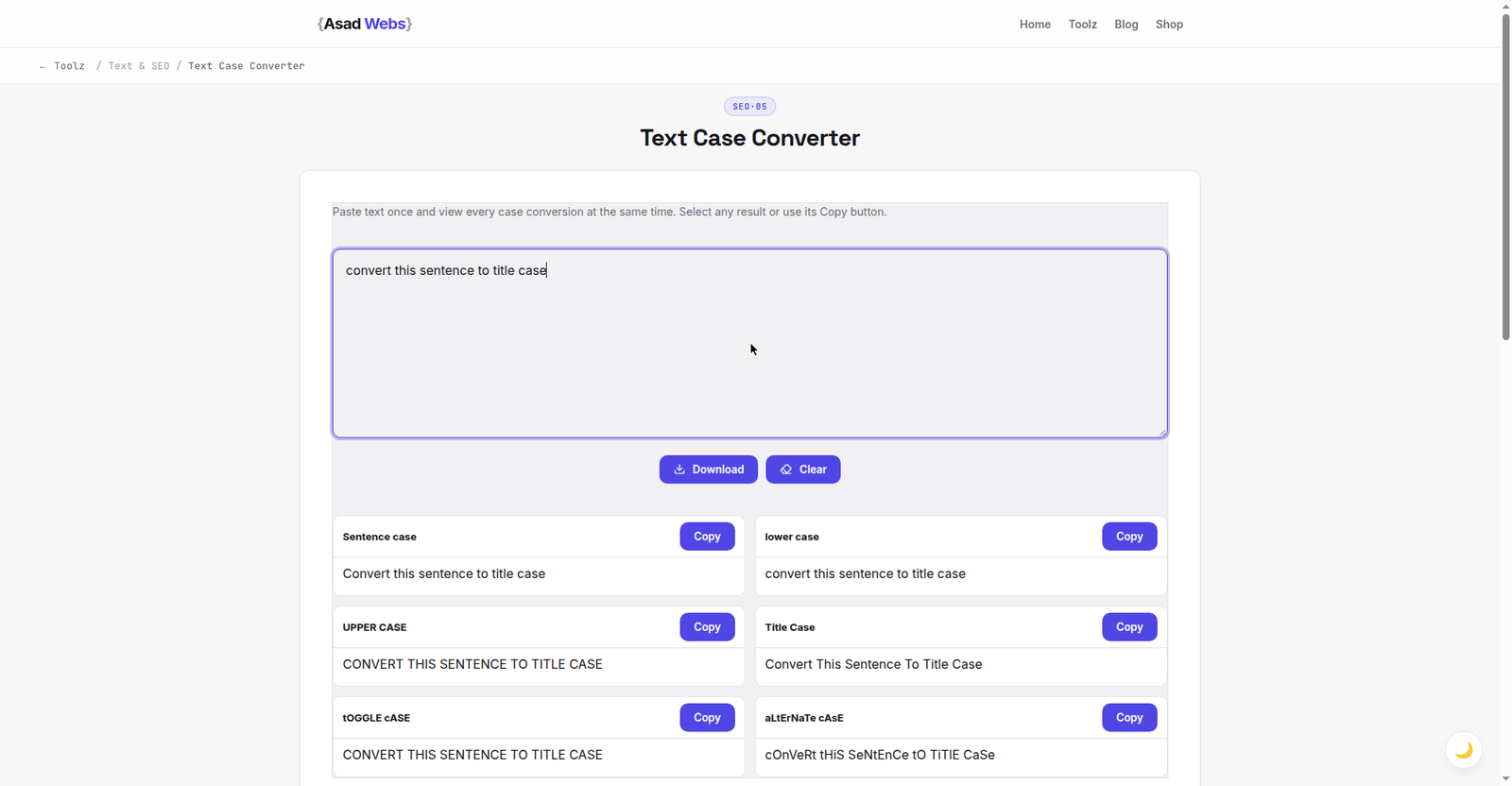
The live converter on a plain lower-case sentence: one click produces Convert This Sentence To Title Case. Click the preview to convert your own text.
The Case Styles, and Where Each One Belongs
Sentence case — first word capitalised, the rest lower except proper nouns — is the default for body text, buttons in many design systems, and modern friendly headlines. Title Case capitalises the important words and suits book-style headlines, page titles and formal documents. UPPERCASE belongs in short labels, warnings and acronyms; in sentences it reads as shouting and is measurably harder to read. lowercase is for code, URLs, email addresses and data that must match exactly. Most converters also offer aLtErNaTiNg and inverted styles — fun for social posts, wrong for business documents.
The table below is a quick reference for the common jobs. When a document mixes styles — a spreadsheet column of names next to SKUs — convert column by column rather than the whole sheet at once.
| Case style | Example | Use it for |
|---|---|---|
| Sentence case | How to speed up your website | Body text, friendly headlines, UI labels |
| Title Case | How to Speed Up Your Website | Formal headlines, page and document titles |
| UPPERCASE | FREE DELIVERY OVER $50 | Short labels, banners, acronyms |
| lowercase | customer email address | Code, URLs, emails, data matching |
| Capitalise Each Word | Quarterly Sales Report Final | Lists, names, spreadsheet clean-up |
Reading effort by case style for a full sentence (relative, illustrative) — hover or tap each bar for details.
Worked Example: Cleaning a Supplier Product List
Say a supplier sends a PDF catalogue and you paste 40 product names into your store. They arrive in full capitals, like the left column below. The fix takes about two minutes:
| As pasted from the PDF | After conversion | What was applied |
|---|---|---|
| STAINLESS STEEL WATER BOTTLE 750ML | Stainless Steel Water Bottle 750 ml | Title Case, then a space added before the unit |
| ORGANIC COTTON T-SHIRT - NAVY | Organic Cotton T-Shirt - Navy | Title Case |
| USB-C FAST CHARGING CABLE 2M | USB-C Fast Charging Cable 2 m | Title Case, then USB restored by the acronym pass |
The workflow: paste the names column into the converter, choose Title Case, paste the result back into your spreadsheet or CMS, then run the short acronym pass described in the caution below — USB, LED and the handful of special terms your own catalogue actually uses. One discipline matters: convert the names column only, and keep the SKU column untouched. SKUs are data identifiers (see the code and data section below); changing their case can break the match against the supplier's system and your own inventory records, which is a much more expensive problem than ugly capitals.
Title Case Rules Worth Knowing
Real title case is not 'capitalise everything'. Style guides agree on the core: capitalise the first and last words, all nouns, verbs, adjectives and adverbs; lowercase short articles (a, an, the), short prepositions (in, on, at, by) and conjunctions (and, but, or) when they sit mid-title. So 'How to Speed Up a WordPress Website' is correct, and 'How To Speed Up A WordPress Website' is the amateur version a converter's 'capitalise each word' mode produces.
Use a true Title Case mode for headlines, then eyeball the result: long prepositions (Between, Through, Without) are capitalised by most guides, and a word after a colon is usually capitalised too. Thirty seconds of judgement on top of the automatic pass gives you a headline that looks professionally edited.
Doing It in a Spreadsheet or Word Instead
Your existing tools can change case too — here is when each route wins. Excel and Google Sheets offer =UPPER(), =LOWER() and =PROPER() formulas: fine for a column that will live in the sheet, but PROPER is capitalise-each-word, with the headline problem described above; there is no built-in sentence-case function; and the result sits in a formula you must paste back as values before exporting. Word cycles the case of selected text with Shift+F3 (lowercase, UPPERCASE, Capitalise Each Word) and its Change Case menu adds Sentence case — good for a paragraph inside a document you are already editing. The online converter wins when the text comes from somewhere else (a PDF, an email, a CMS export), when you need true Title Case or line-by-line list conversion, or when the text should never be saved to a file at all — the conversion happens in your browser and nothing is uploaded.
The Acronym and Name Caution
Case converters are literal: lowercase mode turns 'NASA' and 'iPhone' into 'nasa' and 'iphone', and capitalise-each-word turns 'McDonald' into 'Mcdonald'. For short texts, fix these by eye after converting. For long lists, convert first, then run a quick find-and-replace pass for the handful of special names and acronyms your text actually contains — there are rarely more than five or six.
If the text also needs cleaning beyond case — extra spaces, line breaks, duplicate lines — pair this with the Text Editor on the free tools page, which handles general tidying in the same browser tab workflow.
Case in Code and Data: Where It Stops Being Cosmetic
In code and data, case is meaning. URLs, file names on Linux servers, passwords, hashtags and database keys can all be case-sensitive: 'Photo.JPG' and 'photo.jpg' may be two different files to a server while looking identical to you. Convert identifiers deliberately, keep a note of the convention a project uses (camelCase, snake_case, kebab-case), and never bulk-lowercase anything that will be matched against an existing system — that is how working links and logins break.
Five Case Mistakes That Make Copy Look Amateur
- Whole paragraphs in capitals. Beyond a short label, capitals slow reading down (see the chart above) and read as shouting. Sentence case is the professional default for anything longer than a few words.
- Capitalise-each-word headlines. 'How To Fix Your Website Today' is the giveaway of an unedited converter pass. Use true Title Case or sentence case — and say which one your site uses.
- Mixed heading styles across one site. Title Case on one page, sentence case on the next, capitals on a third. Readers may not name the problem, but the site feels unpolished. Pick one heading style and apply it everywhere.
- Changing case in file names and URLs. Renaming Photo.JPG to photo.jpg on a case-sensitive server breaks every link pointing at the original. Case edits belong in display text, not in identifiers.
- Trusting the automatic pass completely. Names, acronyms and brand spellings (iPhone, eBay, McDonald) survive no automatic conversion unchanged. The 30-second eyeball pass is part of the job, not an optional extra.
Tidying text is usually one step in publishing something bigger. The Asad Webs blog has practical guides to the rest of the job — metadata, keywords, image prep and launch checks.
Polishing text for a website, store or campaign? Clean copy is part of a professional presence. Book a free consultation — content structure and copy polish are built into our website packages.
Frequently Asked Questions
How do I convert ALL CAPS text to normal sentences?
Paste it into the Text Case Converter and choose Sentence case. Then capitalise any names the converter could not know were proper nouns.
What is the difference between Title Case and Capitalise Each Word?
Title Case follows style rules — short words like 'a', 'the' and 'in' stay lowercase mid-title. Capitalise Each Word capitalises literally every word, which looks wrong in a headline.
Is the text case converter free and private?
Yes — it is free and runs in your browser, so pasted text stays on your device. That makes it safe for drafts and lists you would not send to a server.
Can I convert a whole list at once?
Yes. Paste one item per line and the conversion applies line by line, which is ideal for spreadsheet columns, product names and headline lists.
Why did my acronym change when I converted case?
Converters apply rules literally, so NASA can become Nasa or nasa. Fix the few acronyms and special names in your text with a quick find-and-replace after converting.
Can I change case in Excel or Google Sheets without a converter?
Yes — use =UPPER(), =LOWER() or =PROPER() and paste the results back as values. But PROPER capitalises every word rather than applying true title-case rules, there is no sentence-case function, and text from PDFs or emails still has to get into the sheet first. For one-off jobs and lists, the online converter is faster.
Does changing the case of my headings affect SEO?
Display case does not change what a heading says — search engines read the words, not the capitalisation, so the sentence-case and Title Case versions of a headline are equivalent to them. What matters is consistency for readers, and keeping the URLs themselves lowercase, since mixed-case URLs can create duplicate-address confusion on some servers.
Be the first to share a useful question or thought.