
Most AI art tools work the same way: type a prompt, cross your fingers, regenerate. ArtCraft is built on the opposite bet. It is a free, open-source studio that calls itself "the IDE for artists" — you compose the shot in a 2D canvas, stage it in 3D with posed characters and a placed camera, and only then hand the scene to one of 62 AI models to render. The project, developed by the Storytold team and dual-licensed under MIT/Apache-2.0, has passed 35,000 stars on GitHub, with 28 releases — and its pitch is ownership: "Stop renting from websites. ArtCraft is yours to own and keep, forever."
The Crafting Apps: thirteen free alternatives to the software you rent
The studio is only half the story. The same team also builds the Crafting Apps — thirteen open-source desktop apps, each a clean-room rebuild of a famous (and expensive) program, written from scratch in pure Rust. They are free, they copy the layouts, tools and shortcuts professionals already know, they run entirely on your own machine with your own files, and an ArtCraft Launcher installs and updates the whole set. Founder Brandon Thomas — formerly of Storyteller.ai and Square — built the first versions with AI coding agents after, by his own account, one Adobe cancellation fee too many; coverage by TechRepublic, AppleInsider and others has followed the project since the first seven apps appeared in late September 2026.
| Crafting App | What it does | Free alternative to | Status |
|---|---|---|---|
| PhotoCraft | Image editing — layers, masks, adjustments, brushes, PSD support | Adobe Photoshop | Early alpha |
| VectorCraft | Vector illustration — pen and Bézier paths, Pathfinder booleans, gradient mesh, perspective grid, multiple artboards | Adobe Illustrator | In development |
| FilmCraft | Video editing — multi-track timeline, scopes, colour and sound | Adobe Premiere Pro | In development |
| LightCraft | Photo library and RAW development | Adobe Lightroom | In development |
| PdfCraft | PDF workbench — read, organise, combine, split, sign and secure | Adobe Acrobat Pro | Early alpha |
| EffectCraft | Motion graphics and visual effects | Adobe After Effects | In development |
| DesignCraft | Page layout and publishing — threaded text frames, magazine spreads | Adobe InDesign | In development |
| FigCraft | Interface design and prototyping — components, auto layout, design variables | Figma | Early alpha |
| WordCraft | Word processing with a familiar ribbon and styles | Microsoft Word | In development |
| GridCraft | Spreadsheets and data analysis — tables, conditional formatting, charts | Microsoft Excel | In development |
| DeckCraft | Presentations and slide shows | Microsoft PowerPoint | In development |
| SoundCraft | Audio recording, editing and mixing — a digital audio workstation | Avid Pro Tools | In development |
| CADCraft | Computer-aided design and drafting, with a command line | AutoCAD | In development |
How far along are they? Honestly: early. Three apps are labelled early alpha and the rest in development, and by the project's own published estimates the front-runners sit around 55–65% of the way to everyday professional readiness (VectorCraft ≈65%, LightCraft ≈61%, WordCraft ≈60%, FilmCraft ≈56%, PdfCraft ≈55% for everyday work), with DesignCraft (≈47%) and EffectCraft (≈45%) further back. PhotoCraft, the flagship, has drawn close to 65,000 GitHub stars on its own. These are not drop-in replacements for a working studio today — they are something arguably more disruptive: the complete map of one, being built in the open at a speed nobody budgeted for.
See them: five of the Crafting Apps in action
These are the project's own screenshots — the interfaces follow the Adobe originals closely enough that the learning curve is close to zero:
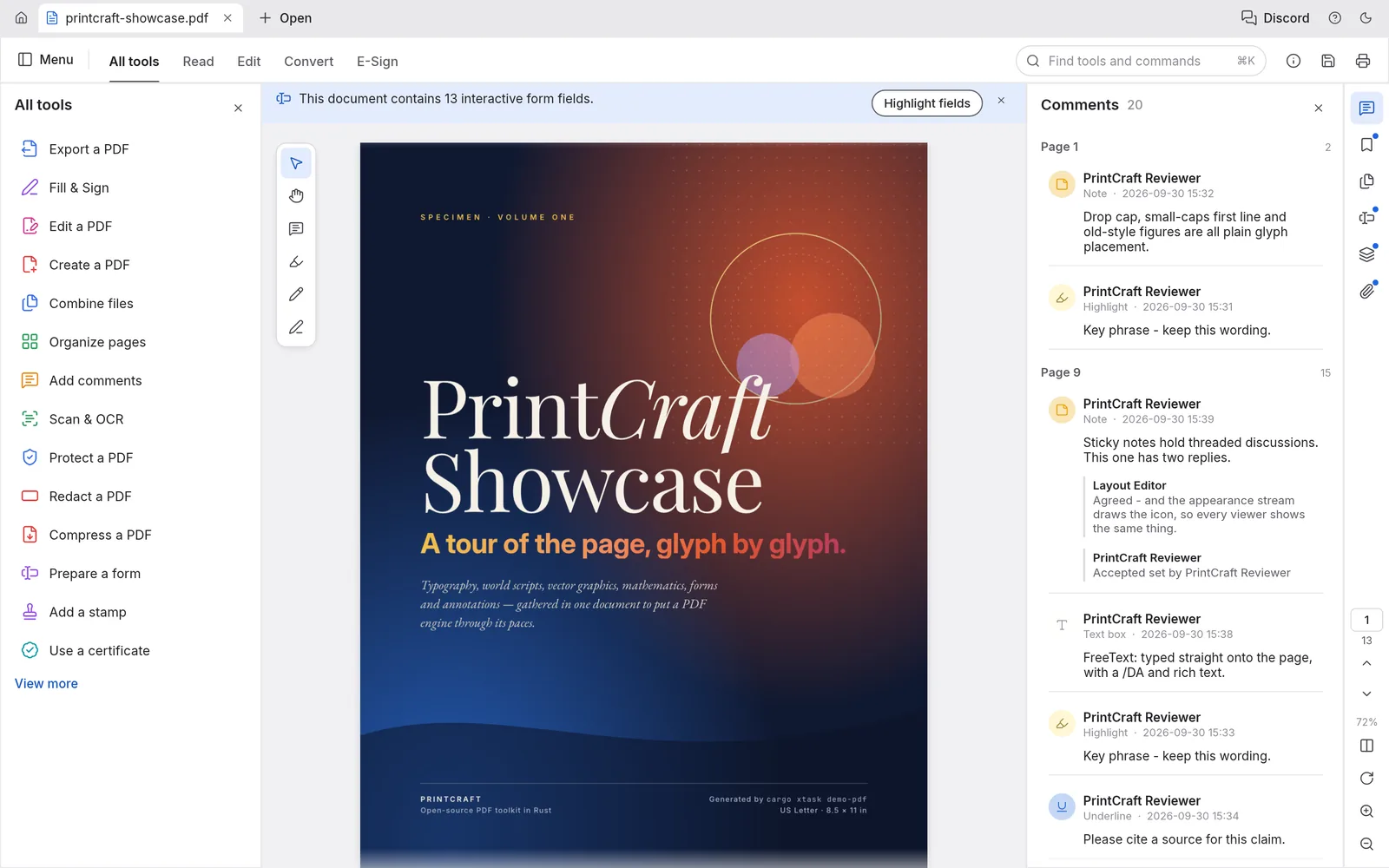
PdfCraft — the Acrobat alternative: read, edit, combine, sign and secure PDFs, with threaded comments. Early alpha.
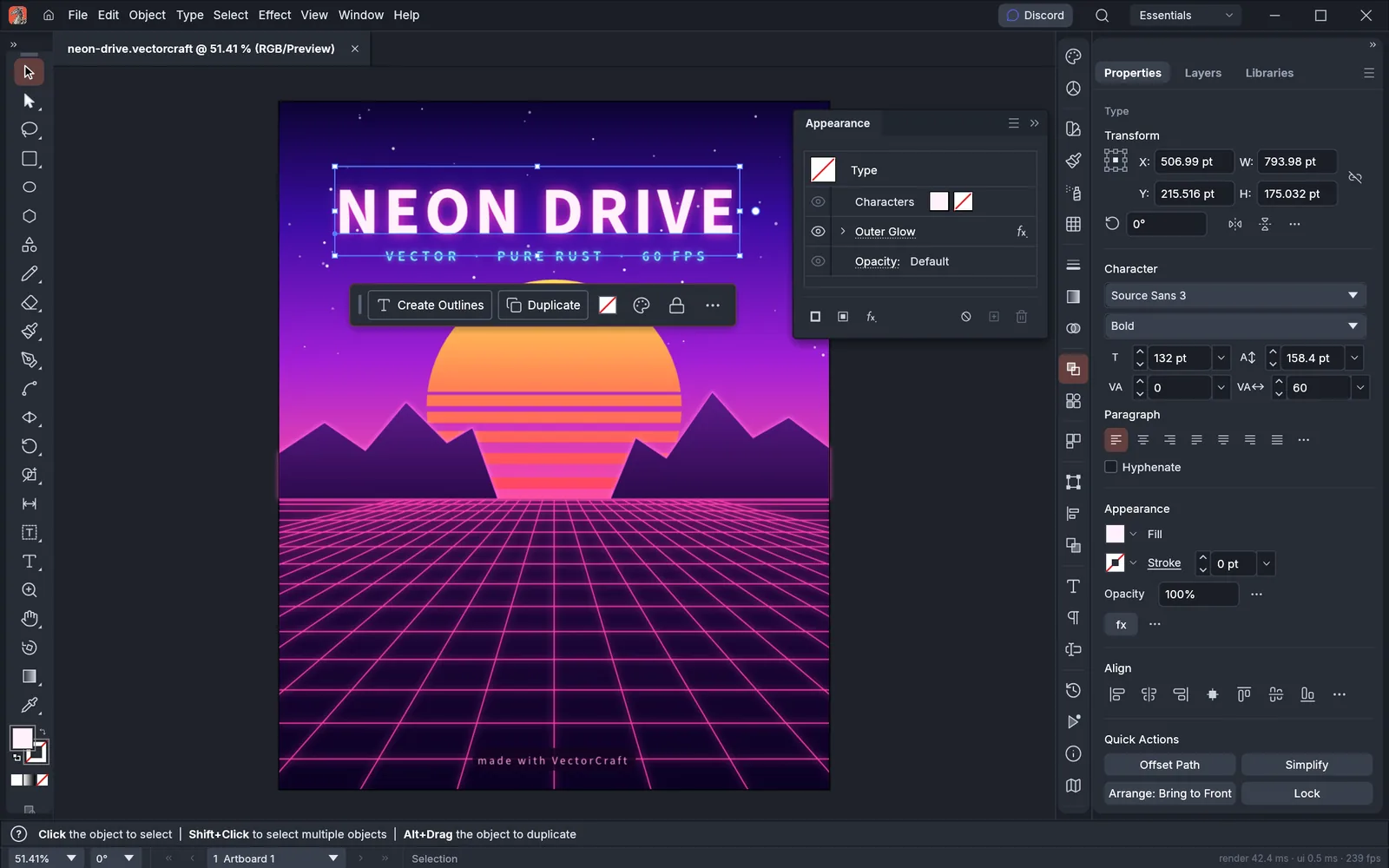
VectorCraft — the Illustrator alternative: pen and Bézier paths, Pathfinder booleans, gradient mesh, perspective grid and live effects. In development.
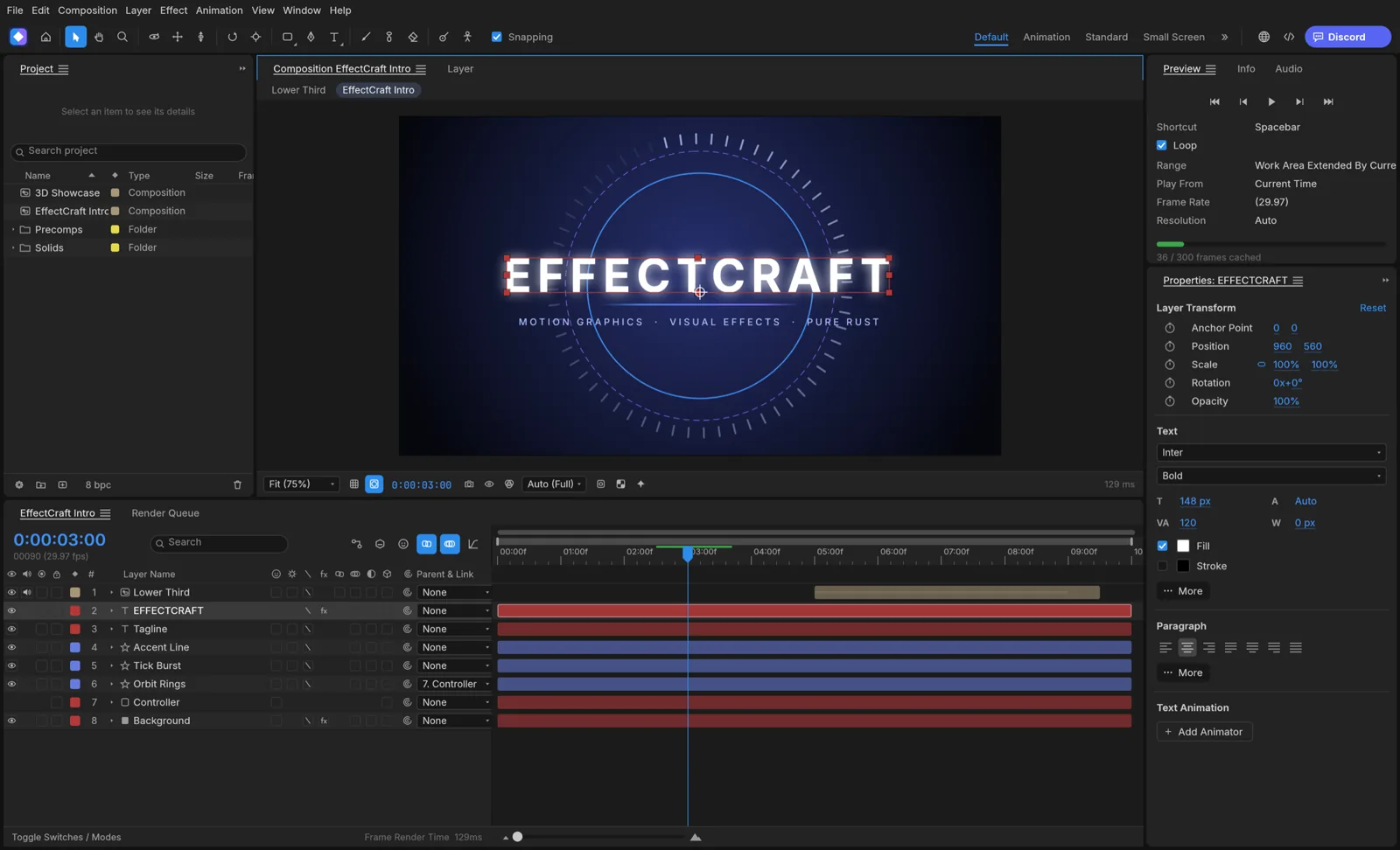
EffectCraft — the After Effects alternative: compositions, solid, shape and text layers, keyframed in the timeline. In development.
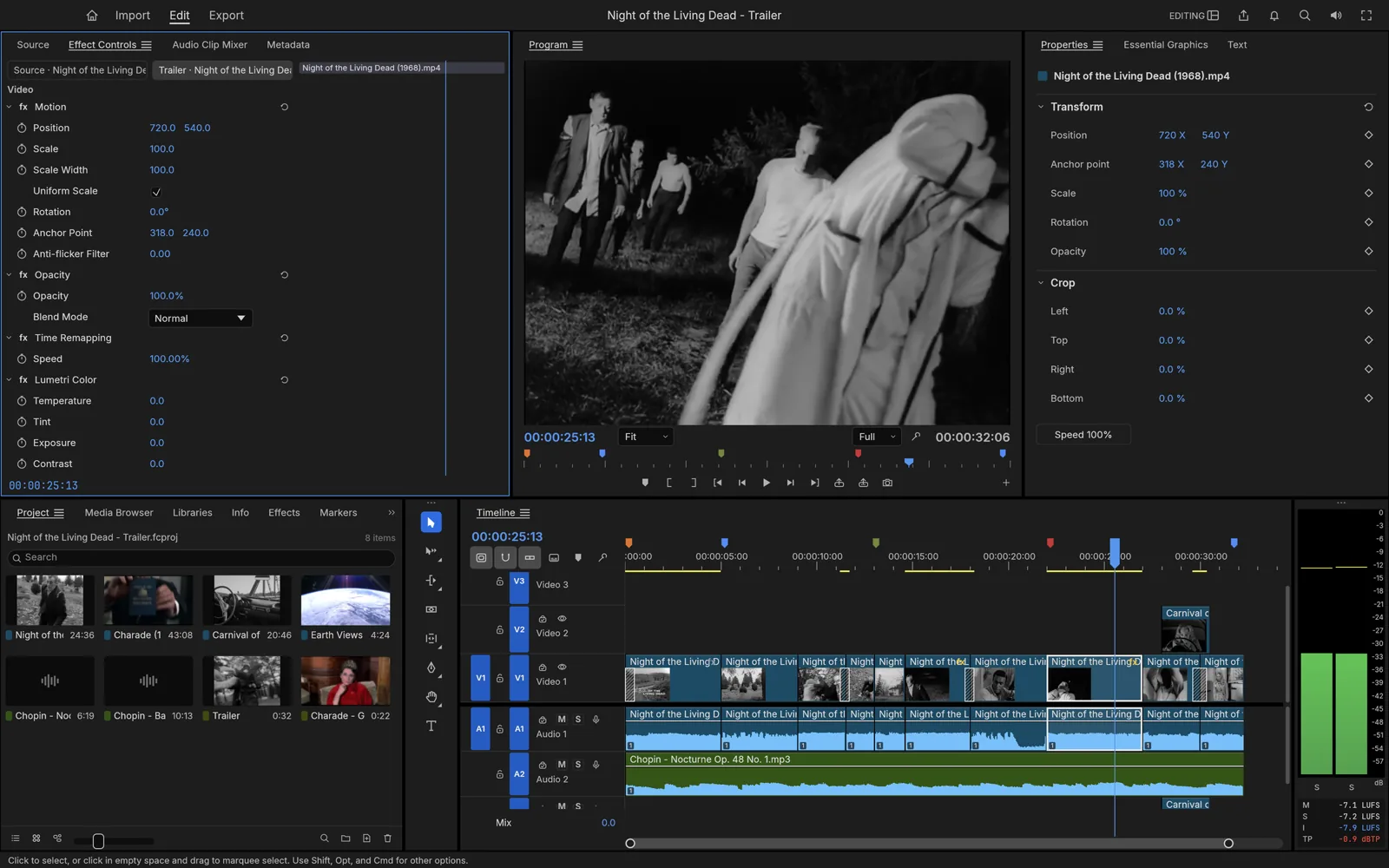
FilmCraft — the Premiere Pro alternative: multi-track timeline, program monitor, scopes and colour tools. In development.
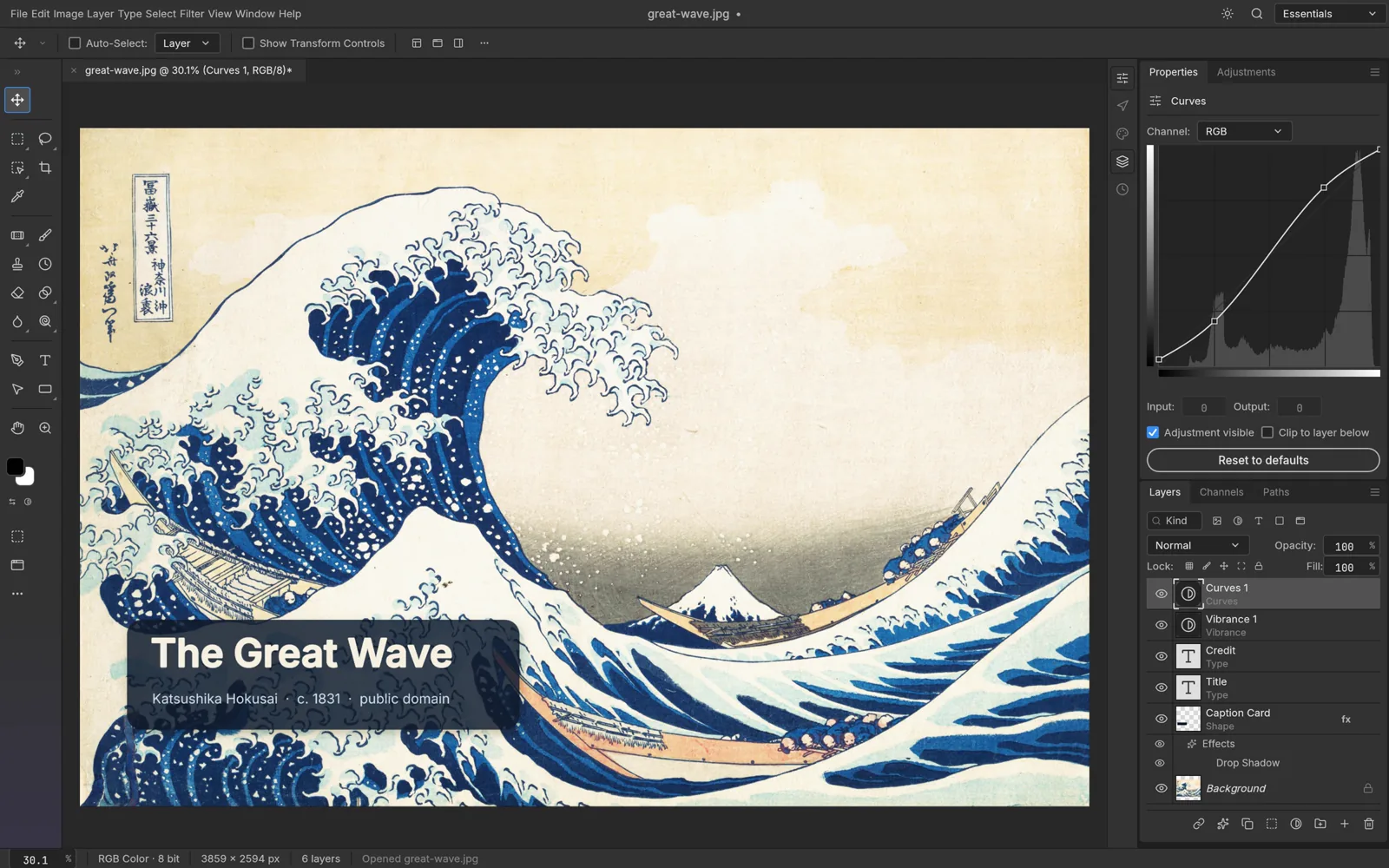
PhotoCraft — the Photoshop alternative: layers, Curves and Vibrance adjustments, type layers and PSD-style workflow. Early alpha.
The Windows + Adobe monopoly is about to end
For thirty years the creative stack had two landlords: you worked on whatever operating system the tools demanded, and you rented the tools themselves by the month — Adobe Creative Cloud Pro runs about $69.99 a month, roughly $840 a year, per seat, forever, with cancellation fees if you leave early. The Crafting Apps attack both halves of that arrangement at once:
- Cross-platform, natively. Every app is a real native program — not an Electron wrapper — with installers for Windows, macOS and Linux. Your OS stops being a software decision.
- In the browser, too. Twelve of the thirteen apps also compile to WebAssembly and run in a browser tab — PhotoCraft, VectorCraft, LightCraft, PdfCraft, EffectCraft, DesignCraft, FigCraft, WordCraft, SoundCraft, DeckCraft, CADCraft and GridCraft — so even the install is optional.
- Free and open, permanently. MIT/Apache-2.0 code on GitHub: no subscription, no lock-in period, no cancellation fee, and the apps keep working whether or not the company behind them does.
- Yours locally. Files live on your machine and are processed there — no cloud round-trip between you and your work — and every app is agent-ready, drivable from a CLI, a JSON channel or an MCP server for automation.
None of that makes Photoshop obsolete this quarter — professionals buy reliability, not roadmaps. But the direction of travel is new: when a familiar, free, cross-platform equivalent of the whole suite exists and improves in public every week, the rent stops looking inevitable. The monopoly does not end with a better product launch; it ends when "good enough and free, everywhere" quietly becomes true.
The idea: build the scene first, generate second
ArtCraft's own framing is that text prompting is neat, but artists crave control — "compose the shot yourself, then let the model render it." So the studio's centre of gravity is a set of crafting tools that decide the picture before any model runs:
| Tool | What it does |
|---|---|
| Image to Location | Places virtual actors into a physical environment and holds that location consistent, so you can shoot multiple shots in the same room without things disappearing between frames |
| 3D Compositing | Layers backdrops, foreground elements and props in a scene with real depth — a couple of images blend into a finished composition |
| 2D Compositing | Combines images, background removal, layers and simple drawing tools for precise flat compositions |
| Image to 3D Mesh | Turns an image into a 3D object you can position, rotate and frame exactly, instead of fighting a prompt for placement |
| Character Posing | Poses characters dynamically and sets the camera before generation — blocking, the way a director does it |
| Scene Blocking with Kitbashing | Combines 3D asset kits to control camera angles, object placement and depth layering |
| Character Identity Transfer | Uses a posed mannequin to guide where your actual character stands and how it is posed in the render |
| Background Removal | Isolates subjects as clean cutouts to reuse as props, layers or backdrops in 2D and 3D scenes |
| Mixed Asset Crafting | Combines image cutouts, generated worlds and 3D meshes in one canvas |
Alongside those sit the quick tools for when you do just want to prompt: text to image, prompted image editing (describe the change; models such as Nano Banana Pro and GPT Image carry it out), canvas image editing with drawing, masks and inpainting, and image to video.
62 models under one roof
ArtCraft is deliberately not a model — it is the workbench in front of many models, with "no aggregator between you and the models." Its catalogue, per the project's documentation, spans five kinds of generation:
| Kind | Count | Families included |
|---|---|---|
| Images | 16 | Nano Banana, Nano Banana 2 and Pro; GPT Image 1.5 and 2; FLUX.1 and FLUX 1.1 Pro; Seedream 4 and 5 |
| Video | 25 | Seedance 1.5/2.0, Kling up to 3.0, Veo 3.1 family, Sora 2, Vidu Q3, MiniMax H3, Flux 3 |
| Music and sound | 5 | Suno (music, remix, sounds, samples), Seed Audio 1.0 |
| 3D meshes | 11 | Hunyuan 3D 2.0–3.1, Tripo3D, Meshy 6, Rodin 2.5 |
| Worlds & Gaussian splats | 5 | World Labs' Marble 1.0–1.1 Plus, TripoSplat |
Direct provider integrations include Grok Imagine, Midjourney, Sora and World Labs, with more (Runway, Luma, Google) listed as planned. For filmmakers and AI-video creators, the practical consequence is continuity: the same posed scene and the same room can be rendered through different models without rebuilding the shot.
Free app, paid generations — the honest pricing picture
ArtCraft the application is free and open source, permanently: stable builds for Windows and macOS, Linux by building from source, and a browser studio that needs no install. What costs money is generation. According to the official pricing page, you can bring your own compute and third-party subscriptions, or buy ArtCraft's optional credit plans — currently shown with a 20%-off promotion: Basic at $8/month billed yearly (1,000 credits a month, roughly 250 Nano Banana images or about a minute of Seedance 2.0 video), Pro at $28/month (3,750 credits) and Max at $48/month (6,600 credits), plus one-time credit packs that never expire and an Enterprise tier. Credits are refunded if a generation fails, and every paid plan still leaves you owning the app itself.
Who it is for
ArtCraft makes most sense for creators whose work lives or dies on consistency: AI filmmakers shooting sequences in one location, concept artists art-directing a scene rather than gambling on prompts, and designers who want layered, repeatable compositions with the newest image and video models a click apart. If your workflow is "one prompt, one poster," it is more studio than you need; if you have ever regenerated forty times because the chair moved, it was built for you.
Now fight it out: Team Free or Team Adobe?
Here is the part where we stop being polite, because this is genuinely the biggest question in creative software right now. If the Crafting Apps hit 90% next year, do you cancel Creative Cloud — or is Adobe still worth $840 a year? The comments on this one are going to split into camps, so pick yours:
- Team Free: "The rent is theft. Familiar layout, my files on my machine, every platform and the browser — Adobe had a good thirty years."
- Team Adobe: "Call me when a paying client's file opens perfectly at 2 a.m. on deadline. Alpha software is a hobby, not a business."
- Team Wait-and-See: "Both. I keep the subscription and test every Craft release — the day PhotoCraft opens my PSDs flawlessly is the day I downgrade."
So: which camp are you — and what is the ONE feature a Craft app must nail before you would trust it with real work? Name the app and the feature. The most honest answer gets pinned. And if you know a designer still paying full price who has never heard of these apps, tag them in — let's see a real comment war.
Frequently Asked Questions
Is ArtCraft really free?
The application is free and open source (dual-licensed MIT/Apache-2.0), and you keep it forever. Generating with cloud models costs credits — via optional ArtCraft plans (from $8/month billed yearly at the current promotional price) or your own third-party subscriptions and compute.
Which platforms does ArtCraft run on?
Stable desktop releases for Windows and macOS; Linux by building from source; and a browser-based studio at app.getartcraft.com.
How is ArtCraft different from Midjourney or a normal image generator?
Those are models driven by prompts. ArtCraft is the staging layer in front of the models: you compose in 2D, block the scene in 3D, pose characters and place the camera first, then render through whichever of its 62 models fits — including Midjourney itself.
Can the Crafting Apps really replace Adobe Creative Cloud?
Not yet for demanding professional work — three are in early alpha and the rest in development, at roughly 45–65% of full readiness by the project's own estimates. They are already worth testing for learning, personal projects and lighter production work, and they are improving in public every week.
Do the Crafting Apps run in the browser?
Most of them: twelve of the thirteen also compile to WebAssembly and run in a browser tab, alongside native installers for Windows, macOS and Linux. FilmCraft, the video editor, is desktop-only for now.
Be the first to share a useful question or thought.