
You can generate a hash online for free in seconds: open the Hash Generator, paste your text, and read its digital fingerprint in MD5, SHA-1, SHA-256 and other common algorithms. Change one letter of the input and the fingerprint changes completely — that sensitivity is exactly what makes hashes useful.
A hash is a one-way fingerprint: easy to compute from data, practically impossible to reverse back into the data. Software publishers use hashes as checksums so you can prove a download was not corrupted or tampered with; systems use them to detect duplicate or changed files. This guide explains the main algorithms, the verification habit worth learning, and the limits — especially around passwords, where the wrong hash choice is a genuine security failure.
Generate a Hash in 3 Steps
- Open the generator. Go to the Hash Generator in your browser.
- Paste your text. Type or paste exactly what you want fingerprinted — extra spaces or a trailing line break produce a different hash, because they are different data.
- Copy the hash you need. SHA-256 is the modern default for checksums. Compare character by character (or with a file-compare) — two hashes either match exactly or the data differs.
Tool preview: one word, four hashes
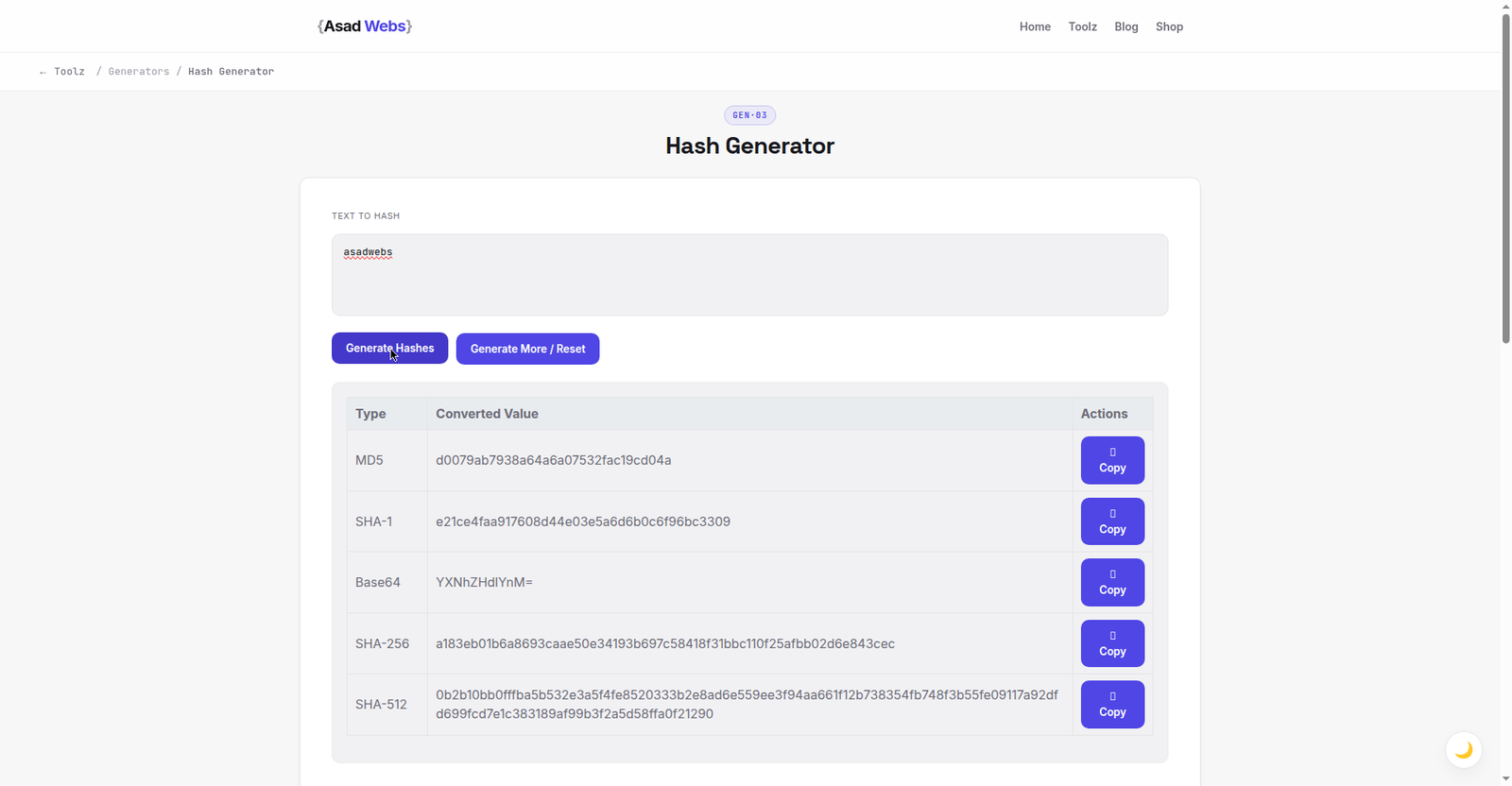
The live generator on a single word — asadwebs becomes MD5 d0079ab7938a64a6a07532fac19cd04a, with SHA-1, SHA-256 and SHA-512 beside it. Click the preview to hash your own text.
MD5, SHA-1 and SHA-256: What Is the Difference?
The algorithms differ mainly in fingerprint length and in how hard they are to forge. MD5 produces a 128-bit hash (32 hex characters) and is fast, but researchers demonstrated practical ways to craft two different files with the same MD5 — so MD5 is fine as a casual duplicate-check and unfit wherever forgery matters. SHA-1 (160-bit) went the same way and is deprecated for security uses. SHA-256 (256-bit, 64 hex characters) is the current standard for checksums, certificates and integrity checks: no practical forgery method is known.
A longer hash is not 'more encrypted' — hashing is not encryption at all. There is no key and no decryption; the same input always yields the same output, which is the property every use in the table relies on.
| Algorithm | Hash length | Status in 2026 | Good for |
|---|---|---|---|
| MD5 | 32 hex characters | Broken for security; fine for casual checks | Spotting duplicate files, quick change checks |
| SHA-1 | 40 hex characters | Deprecated for security | Legacy checksums (e.g. older git data) |
| SHA-256 | 64 hex characters | Current standard | Download verification, integrity, certificates |
| SHA-512 | 128 hex characters | Current standard | High-assurance integrity checks |
Hash fingerprint length by algorithm (hex characters) — hover or tap each bar for details.
The Download Checksum Habit (Worth Learning)
Many publishers list a SHA-256 checksum next to a download. The verification routine takes under a minute: download the file, generate the hash of the file's contents (operating systems have built-in tools for files; a text hash generator demonstrates the principle), and compare it with the published value. Match — the file is bit-for-bit what the publisher released. Mismatch — the download was corrupted or substituted; delete it and download again from the official source.
This habit matters most for software installers, firmware, disk images and financial documents — anything you would not want silently altered. If a publisher offers no checksum at all for a sensitive download, that absence is itself information about their care.
Worked Example: Verify a Download in Under a Minute
Every operating system can hash a file with a built-in command — no install needed. Download the file, run the command for your system, and compare the output with the checksum the publisher lists:
| System | Command | What you get |
|---|---|---|
| Windows (Command Prompt) | certutil -hashfile filename.iso SHA256 | The file's SHA-256 fingerprint |
| macOS (Terminal) | shasum -a 256 filename.dmg | The file's SHA-256 fingerprint |
| Linux (Terminal) | sha256sum filename.tar.gz | The file's SHA-256 fingerprint |
Compare the full string, not the first few characters — a real forgery attempt matches nothing, but a careless glance can miss a difference in the middle. Try the principle first with text you control: paste hello world (exactly, no capital, no trailing space) into the Hash Generator and you should see SHA-256 b94d27b9934d3e08a52e52d7da7dabfac484efe37a5380ee9088f7ace2efcde9 and MD5 5eb63bbbe01eeed093cb22bb8f5acdc3. If yours differ, the input differed — that sensitivity is the entire point, and it is why step 2 of the guide warns about stray spaces.
Why Hashes Are Not Password Storage
The commonest dangerous misunderstanding: 'we hash passwords with MD5, so they are safe.' MD5 and SHA are designed to be fast, and fast is exactly what an attacker with a stolen password database wants — billions of guesses per second against common passwords. Proper password storage uses slow, salted password-hashing functions (bcrypt, scrypt or Argon2) designed for the job.
For a website owner, the practical takeaway is to use a platform that handles this correctly rather than anything home-grown, and to treat any tool or plugin advertising 'MD5 password security' as a red flag. If you run a WordPress site, our guide to WordPress performance covers the maintenance side, and launch-time security checks are in the website launch checklist.
Why the Same Text Can Produce a Different Hash
If your hash does not match an expected value, the data almost always differed in a way you cannot see. The three usual culprits: line endings — Windows text files end lines with two characters (CR+LF) where Mac and Linux use one (LF), so the 'same' document saved on different systems hashes differently; encoding — text saved as UTF-8 vs UTF-16 is different bytes under the letters; and invisible extras — a trailing newline or space from a copy-paste. None of these mean the tool is wrong; they mean the fingerprint did its job. When a check fails, standardise the input first (same file, same source, no retyping) before suspecting anything more sinister.
Everyday Uses Beyond Security
Hashes quietly power ordinary jobs: photo libraries detect duplicates by fingerprint rather than by name, backup tools skip unchanged files by comparing hashes, developers confirm two environments hold identical configuration text, and support teams verify a customer is looking at the same document version by comparing a short fingerprint instead of emailing whole files. Whenever the question is 'is this exactly the same as that?' — a hash is the smallest possible answer. More developer-friendly utilities are collected on the free tools page.
Five Hash Mistakes to Avoid
- Using MD5 or SHA-1 where forgery matters. Both are fine for spotting accidental corruption or duplicates; neither should vouch for a file's authenticity in 2026. SHA-256 is the default for anything security-shaped.
- Pasting real passwords into online tools. Even a client-side tool teaches a dangerous habit and shoulder-surfers are real. Hash sample text for learning; keep real credentials out of every web form that is not the login itself.
- Comparing only the beginning of two hashes. 'Starts the same' is not a match. Compare the whole string — or let a diff tool do it — because a single different character means different data.
- Trusting a checksum from the same page as the download. A checksum proves a file matches the publisher's value only if the value itself came from a trustworthy place. If a download page were compromised, its listed checksum could be replaced too — checksums published through a second channel (a signed release note, a separate official page) are stronger.
- Re-typing the input instead of copying it. Retyped text picks up different spacing, punctuation or smart quotes, and the hash 'fails' for boring reasons. Copy the exact bytes, or hash the file itself.
Hashes are one of those small technical habits that separate careful site owners from hopeful ones. The Asad Webs blog covers the others — backups, updates, launch checks — in plain, testable steps.
Checking hashes as part of a bigger security or development task? Book a free consultation — we build and maintain websites and custom applications where security details like this are handled properly, not improvised.
Frequently Asked Questions
Can a hash be reversed to get the original text?
No — hashing is one-way by design. For short, guessable inputs an attacker can try candidates until one matches, which is why fast hashes must never protect passwords.
Which hash should I use to verify a download?
SHA-256. It is the current standard publishers list, and no practical forgery method is known. MD5 checksums still appear, but treat them as a corruption check only, not proof against tampering.
Why did my hash change when I pasted the same text again?
The input was not identical — a trailing space, an extra line break, or different capitalisation is different data. Paste carefully and trim stray whitespace.
Is the hash generator private?
The Hash Generator runs in your browser, so pasted text stays on your device. Even so, never paste real passwords into any hash tool — generate hashes of sample text only.
What does a checksum mismatch mean?
The file or text you hashed is not identical to the one the checksum came from — corrupted in transit or different altogether. Re-download from the official source and check again.
How do I hash a file on Windows or Mac without installing anything?
Both systems have it built in. On Windows, open Command Prompt and run: certutil -hashfile yourfile SHA256. On a Mac, open Terminal and run: shasum -a 256 yourfile. Linux uses sha256sum yourfile. Compare the output with the publisher's listed checksum, in full.
Is hashing the same as encryption?
No. Encryption is reversible with a key — it is designed to give the data back. Hashing is a one-way fingerprint: it proves data is unchanged and stores nothing recoverable. Encrypt files you need to read again; hash data you need to verify.
Be the first to share a useful question or thought.